All Apps
About PreOrder
Keep selling even when stock runs out.
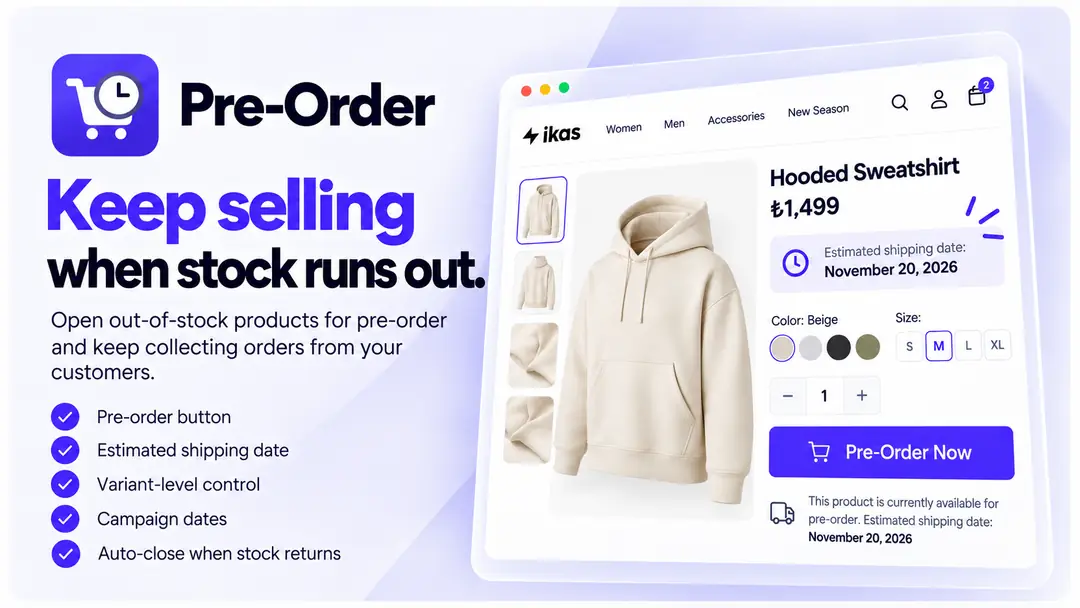
Use PreOrder to sell products that are out of stock, launching soon, or scheduled to ship at a later date. Manage products and variants, show estimated shipping dates to your customers, and keep capturing sales while waiting for new stock.
With PreOrder, you can enable pre-orders at product or variant level, define campaign dates, set a maximum pre-order quantity, automatically disable pre-orders when stock returns, and manage your pre-order operations from one place.
Why PreOrder?
Running out of stock does not necessarily mean your customers have stopped wanting the product. Instead of removing the product from sale completely, you can collect orders in advance, clearly communicate shipping expectations, and continue selling until new stock arrives.
- Keep selling out-of-stock products. Continue collecting orders while waiting for inventory to be replenished.
- Launch new products earlier. Measure demand before new-season, new-collection, or upcoming products arrive in stock.
- Enable only the variants you want. Manage colors, sizes, and other variants independently.
- Give customers clear information. Communicate expectations before purchase with estimated shipping dates, badges, and informational text.
- Keep your pre-order capacity under control. Set a maximum pre-order quantity and avoid accepting more orders than planned.
Key Features
Product and variant-level pre-orders
You can enable pre-orders for an entire product or only for selected variants.
For example, a Black / M variant can be available for pre-order while Black / S continues through the normal sales flow. This lets you manage colors, sizes, and other variants independently according to their stock status.
Campaign start and end dates
Choose exactly when your pre-order campaign starts and when it ends.
This makes it easier to manage new-season launches, limited production runs, upcoming inventory, product launches, and other time-limited pre-sale campaigns.
Estimated shipping date
Customers can see the estimated shipping date before placing their order. This helps make the difference between a standard order and a pre-order clear before checkout.
Example: Estimated shipping date: November 20, 2026
Maximum pre-order quantity
Define the maximum number of pre-order units you are willing to accept during a campaign.
For example, if your production or supply capacity is limited to 500 units, you can cap the campaign at 500 pre-orders. Availability is managed based on the quantity already used during the campaign.
Automatically disable pre-orders when stock returns
You can choose to automatically disable pre-order status when a product or variant comes back into stock.
Once the item becomes available through normal inventory again, you do not need to keep checking the app and switching the status manually.
Turkish and English storefront text
Customize the pre-order experience shown to customers on your storefront. You can configure the following fields separately in Turkish and English:
- Pre-order button text
- Pre-order badge
- Informational text
- Estimated shipping information
For example, you can display Ön Sipariş Ver on your Turkish storefront and Pre-Order Now on your English storefront.
What Will Customers See on Your Storefront?
When a customer selects a variant that is eligible for pre-order, the product page clearly shows that the selected item is available for pre-order.
The storefront can display:
- A Pre-Order badge
- A Pre-Order Now button
- The estimated shipping date
- Custom informational text
When the customer switches to another variant, the pre-order status of the newly selected variant is checked again. Variants that are not configured for pre-order continue to use the normal ikas storefront behavior.
This allows a single product to provide a pre-order experience only for the variants you choose, while the remaining variants continue to sell normally.
How Does It Work?
- Select your product.
Find the product you want to make available for pre-order from the app dashboard. - Enable the product or selected variants.
Open the entire product for pre-order or choose only specific variants. - Set campaign dates.
Define when the pre-order campaign starts and when it ends. - Set the estimated shipping date.
Let customers know approximately when their order is expected to ship. - Define the maximum pre-order quantity.
Control how many units can be accepted during the campaign. - Customize storefront text.
Configure button, badge, and informational text in Turkish and English. - Start collecting pre-orders.
Customers who select an eligible variant see the pre-order information and complete their order through the existing ikas checkout flow. - Track results.
Monitor pre-order products, variants, quantities, and pre-order value from the app dashboard.
How Are Pre-Orders Completed?
You do not need a separate payment system or an external checkout page for pre-orders.
After selecting an eligible pre-order product, the customer continues through the existing ikas checkout flow and completes the order using the payment methods available in your store.
Your normal storefront checkout experience remains in place.
Track Your Pre-Orders in One Place
The app dashboard brings together the essential information you need to manage your pre-order operations.
- Active pre-order products
- Variants currently available for pre-order
- Pre-order quantities sold
- Pre-order value
- Campaign status
- Used and remaining pre-order capacity
- Items that may require attention
Normal orders are not included in pre-order figures. This allows you to evaluate pre-order campaigns separately from your regular sales.
About Pre-Order Value: The Pre-Order Value shown in the app represents the merchandise value of pre-order line items at the time they were created. It should not be interpreted as collected payment, net revenue, or financial settlement value.
Where Can You Use PreOrder?
Products waiting for stock replenishment
If a popular product sells out, continue collecting orders instead of completely removing it from sale while waiting for new stock.
New-season and new-collection products
Start selling new products before they physically arrive in your warehouse and measure early customer demand.
Limited production runs
Set your available production or supply capacity as a pre-order limit and accept orders without exceeding that capacity.
Made-to-order products
For products that require production time, clearly show customers the estimated shipping date before accepting their order.
Imported products or products with long lead times
Keep products with long procurement times available for sale instead of removing them completely, using an estimated shipping date to set clear expectations.
New product launches
Launch a pre-order campaign before releasing a new product, measure early demand, and begin collecting orders ahead of the full launch.
Will My Normal Products Be Affected?
No. PreOrder only becomes active for the products and variants that you configure for pre-order.
Products and variants that are not included in a pre-order campaign continue to use the normal ikas storefront behavior.
Frequently Asked Questions
Do I have to enable pre-orders for every product?
No. You decide which products or variants are available for pre-order.
Can I enable pre-orders only for a specific size or color?
Yes. Variants can be managed independently. For example, only an out-of-stock size can be enabled for pre-order while the other sizes continue to sell normally.
Can customers see that a product is a pre-order?
Yes. The storefront can display a pre-order badge, button, informational text, and estimated shipping date.
Can I customize the pre-order button?
Yes. You can customize button, badge, and informational text separately for Turkish and English storefronts.
Can I set campaign start and end dates?
Yes. You can define when the campaign starts and when it ends.
Can I limit how many pre-orders I accept?
Yes. You can set a maximum pre-order quantity and limit the total amount accepted during the campaign.
What happens when stock returns?
If automatic disable is enabled, pre-order status is automatically turned off when the relevant product or variant comes back into stock.
How does the customer pay?
PreOrder uses the existing ikas checkout flow. Customers complete their order using the payment methods already available in your store.
Are normal orders included in pre-order statistics?
No. Orders that are not matched as pre-orders are not included in pre-order quantity or value figures.
Does Pre-Order Value mean net revenue?
No. Pre-Order Value represents the merchandise value of the pre-order line items when they were created. It is not collected payment, net revenue, or a financial settlement amount.
Does a cancellation or refund restore pre-order capacity?
In the first version, cancellations and refunds do not automatically reverse previously used pre-order quantity. The quota is based on the quantity of pre-orders originally created.
Will uninstalling the app affect my normal storefront?
The app is designed to remove its own storefront script during uninstall. When the app is not active, the normal ikas storefront behavior is preserved.
Keep Selling Even When Stock Runs Out
An out-of-stock product does not have to become a lost sale.
With PreOrder, you can keep upcoming and out-of-stock products available for sale, manage variants independently, control campaign capacity, and clearly communicate shipping expectations to your customers.
Keep selling even when stock runs out.
PreOrder
Installs
Release date
Languages
Category
Resources and Links
About PreOrder
Keep selling even when stock runs out.
Use PreOrder to sell products that are out of stock, launching soon, or scheduled to ship at a later date. Manage products and variants, show estimated shipping dates to your customers, and keep capturing sales while waiting for new stock.
With PreOrder, you can enable pre-orders at product or variant level, define campaign dates, set a maximum pre-order quantity, automatically disable pre-orders when stock returns, and manage your pre-order operations from one place.
Why PreOrder?
Running out of stock does not necessarily mean your customers have stopped wanting the product. Instead of removing the product from sale completely, you can collect orders in advance, clearly communicate shipping expectations, and continue selling until new stock arrives.
- Keep selling out-of-stock products. Continue collecting orders while waiting for inventory to be replenished.
- Launch new products earlier. Measure demand before new-season, new-collection, or upcoming products arrive in stock.
- Enable only the variants you want. Manage colors, sizes, and other variants independently.
- Give customers clear information. Communicate expectations before purchase with estimated shipping dates, badges, and informational text.
- Keep your pre-order capacity under control. Set a maximum pre-order quantity and avoid accepting more orders than planned.
Key Features
Product and variant-level pre-orders
You can enable pre-orders for an entire product or only for selected variants.
For example, a Black / M variant can be available for pre-order while Black / S continues through the normal sales flow. This lets you manage colors, sizes, and other variants independently according to their stock status.
Campaign start and end dates
Choose exactly when your pre-order campaign starts and when it ends.
This makes it easier to manage new-season launches, limited production runs, upcoming inventory, product launches, and other time-limited pre-sale campaigns.
Estimated shipping date
Customers can see the estimated shipping date before placing their order. This helps make the difference between a standard order and a pre-order clear before checkout.
Example: Estimated shipping date: November 20, 2026
Maximum pre-order quantity
Define the maximum number of pre-order units you are willing to accept during a campaign.
For example, if your production or supply capacity is limited to 500 units, you can cap the campaign at 500 pre-orders. Availability is managed based on the quantity already used during the campaign.
Automatically disable pre-orders when stock returns
You can choose to automatically disable pre-order status when a product or variant comes back into stock.
Once the item becomes available through normal inventory again, you do not need to keep checking the app and switching the status manually.
Turkish and English storefront text
Customize the pre-order experience shown to customers on your storefront. You can configure the following fields separately in Turkish and English:
- Pre-order button text
- Pre-order badge
- Informational text
- Estimated shipping information
For example, you can display Ön Sipariş Ver on your Turkish storefront and Pre-Order Now on your English storefront.
What Will Customers See on Your Storefront?
When a customer selects a variant that is eligible for pre-order, the product page clearly shows that the selected item is available for pre-order.
The storefront can display:
- A Pre-Order badge
- A Pre-Order Now button
- The estimated shipping date
- Custom informational text
When the customer switches to another variant, the pre-order status of the newly selected variant is checked again. Variants that are not configured for pre-order continue to use the normal ikas storefront behavior.
This allows a single product to provide a pre-order experience only for the variants you choose, while the remaining variants continue to sell normally.
How Does It Work?
- Select your product.
Find the product you want to make available for pre-order from the app dashboard. - Enable the product or selected variants.
Open the entire product for pre-order or choose only specific variants. - Set campaign dates.
Define when the pre-order campaign starts and when it ends. - Set the estimated shipping date.
Let customers know approximately when their order is expected to ship. - Define the maximum pre-order quantity.
Control how many units can be accepted during the campaign. - Customize storefront text.
Configure button, badge, and informational text in Turkish and English. - Start collecting pre-orders.
Customers who select an eligible variant see the pre-order information and complete their order through the existing ikas checkout flow. - Track results.
Monitor pre-order products, variants, quantities, and pre-order value from the app dashboard.
How Are Pre-Orders Completed?
You do not need a separate payment system or an external checkout page for pre-orders.
After selecting an eligible pre-order product, the customer continues through the existing ikas checkout flow and completes the order using the payment methods available in your store.
Your normal storefront checkout experience remains in place.
Track Your Pre-Orders in One Place
The app dashboard brings together the essential information you need to manage your pre-order operations.
- Active pre-order products
- Variants currently available for pre-order
- Pre-order quantities sold
- Pre-order value
- Campaign status
- Used and remaining pre-order capacity
- Items that may require attention
Normal orders are not included in pre-order figures. This allows you to evaluate pre-order campaigns separately from your regular sales.
About Pre-Order Value: The Pre-Order Value shown in the app represents the merchandise value of pre-order line items at the time they were created. It should not be interpreted as collected payment, net revenue, or financial settlement value.
Where Can You Use PreOrder?
Products waiting for stock replenishment
If a popular product sells out, continue collecting orders instead of completely removing it from sale while waiting for new stock.
New-season and new-collection products
Start selling new products before they physically arrive in your warehouse and measure early customer demand.
Limited production runs
Set your available production or supply capacity as a pre-order limit and accept orders without exceeding that capacity.
Made-to-order products
For products that require production time, clearly show customers the estimated shipping date before accepting their order.
Imported products or products with long lead times
Keep products with long procurement times available for sale instead of removing them completely, using an estimated shipping date to set clear expectations.
New product launches
Launch a pre-order campaign before releasing a new product, measure early demand, and begin collecting orders ahead of the full launch.
Will My Normal Products Be Affected?
No. PreOrder only becomes active for the products and variants that you configure for pre-order.
Products and variants that are not included in a pre-order campaign continue to use the normal ikas storefront behavior.
Frequently Asked Questions
Do I have to enable pre-orders for every product?
No. You decide which products or variants are available for pre-order.
Can I enable pre-orders only for a specific size or color?
Yes. Variants can be managed independently. For example, only an out-of-stock size can be enabled for pre-order while the other sizes continue to sell normally.
Can customers see that a product is a pre-order?
Yes. The storefront can display a pre-order badge, button, informational text, and estimated shipping date.
Can I customize the pre-order button?
Yes. You can customize button, badge, and informational text separately for Turkish and English storefronts.
Can I set campaign start and end dates?
Yes. You can define when the campaign starts and when it ends.
Can I limit how many pre-orders I accept?
Yes. You can set a maximum pre-order quantity and limit the total amount accepted during the campaign.
What happens when stock returns?
If automatic disable is enabled, pre-order status is automatically turned off when the relevant product or variant comes back into stock.
How does the customer pay?
PreOrder uses the existing ikas checkout flow. Customers complete their order using the payment methods already available in your store.
Are normal orders included in pre-order statistics?
No. Orders that are not matched as pre-orders are not included in pre-order quantity or value figures.
Does Pre-Order Value mean net revenue?
No. Pre-Order Value represents the merchandise value of the pre-order line items when they were created. It is not collected payment, net revenue, or a financial settlement amount.
Does a cancellation or refund restore pre-order capacity?
In the first version, cancellations and refunds do not automatically reverse previously used pre-order quantity. The quota is based on the quantity of pre-orders originally created.
Will uninstalling the app affect my normal storefront?
The app is designed to remove its own storefront script during uninstall. When the app is not active, the normal ikas storefront behavior is preserved.
Keep Selling Even When Stock Runs Out
An out-of-stock product does not have to become a lost sale.
With PreOrder, you can keep upcoming and out-of-stock products available for sale, manage variants independently, control campaign capacity, and clearly communicate shipping expectations to your customers.
Keep selling even when stock runs out.
PreOrder
Installs
Release date
Languages
Category
Resources and Links