About Staff Timeclock
Staff Timeclock records your shop staff's clock-ins, clock-outs and breaks with a PIN screen opened on a tablet or phone in your shop. It reports late arrivals, early leaves and overtime against a weekly shift plan, and lets you download the monthly timesheet as Excel or CSV. You build the staff list inside the app.
- Staff list: Add staff with a display name and an optional staff code and role. A nickname is enough. When you deactivate someone who has left, their records are kept; when you delete them, the staff member and all their records are deleted.
- PIN sign-in: Leave it empty to generate a 6-digit PIN; if you enter one, use 4 to 6 digits. PINs made of repeated or sequential digits are refused. A PIN is shown only once, when it is created; you can reset it if it is forgotten.
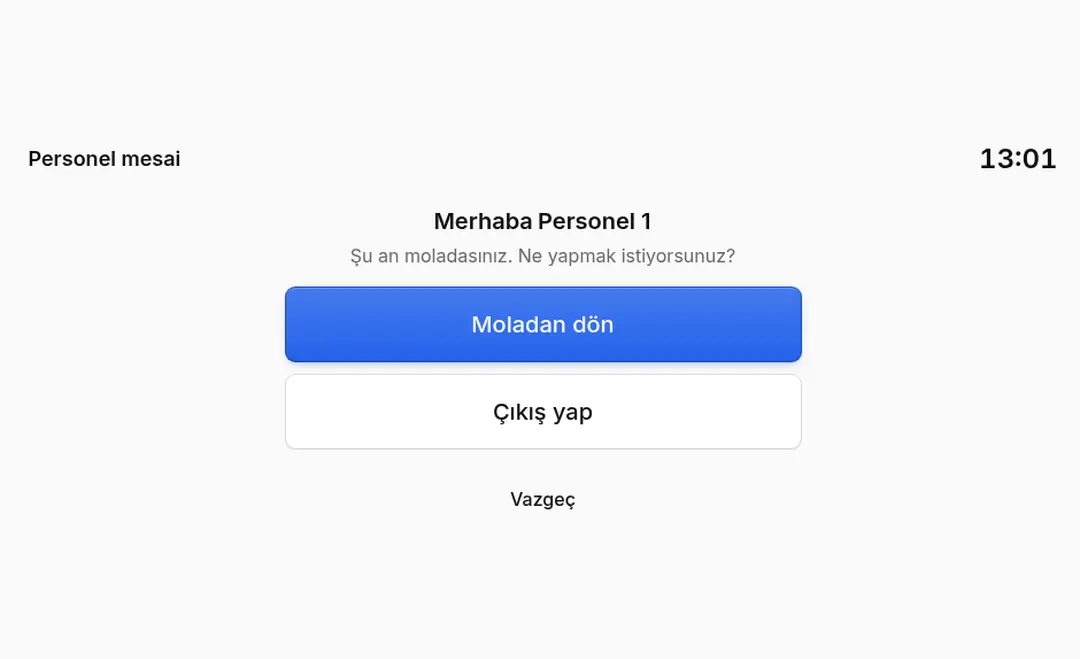
- Kiosk link: Open the link you create on the tablet or phone in your shop. No login is needed: staff pick their name, enter their PIN and tap "Clock in", "Start break", "End break" or "Clock out". Times are recorded by the server clock, not the device clock.
- Wrong-PIN protection: After 5 wrong PINs in a row for one staff member, that person's PIN entry is locked for 15 minutes.
- Renewing the link: When you renew the kiosk link, the old link stops working; you open the kiosks with the new link.
- Weekly shift plan: Enter a start, end and break length per day for each staff member. Shifts that cross midnight are supported. Days without a plan count as unplanned.
- Reports: For a day, week or month, per staff member: time worked, late arrival, early leave, over/under time against the plan, and absent days. Breaks are deducted from worked time. You can set a grace period from 0 to 60 minutes (default 5 minutes).
- Corrections and audit history: Correct wrong or missing records, add a forgotten record by hand, or delete one. Every change is written to the correction history with who made it, when and why; the before and after can be viewed.
- Monthly timesheet: Download the timesheet of the chosen month as Excel (.xlsx) or CSV. Headers are in Turkish and totals match the report. The CSV uses semicolons and opens in Excel with Turkish characters intact.
- Settings: Time zone (used for all day, report and timesheet calculations), kiosk language and kiosk title (for example the branch name).
- Minimal data: The app stores only the name, optional code/role, a PIN digest and time records. Choose how long time records are kept, from 1 to 120 months (default 12 months).
- Permissions: Requests read-only access to order data (View Orders); it never changes your orders.
- Not in this version: Payroll and wage calculation, leave management and offline use are not included in this version. The kiosk needs an internet connection.
- Turkish and English interface.
Setup
- Install the app in your ikas store and approve the permissions.
- In settings, check the time zone, grace period and retention period.
- Add your staff and give each person the PIN shown once on screen.
- Optionally enter a weekly shift plan for each staff member.
- Create the kiosk link and open it on the tablet or phone in your shop.
- Follow records, reports and the monthly timesheet in the dashboard.
Plan and trial
- Plan: Pro.
- 7-day free trial (from first install; reinstalling does not restart it).
Staff Timeclock


App Information
Stores with installations
0-50 stores
Release Date
29 October, 2026

Supported Languages
About Staff Timeclock
Staff Timeclock records your shop staff's clock-ins, clock-outs and breaks with a PIN screen opened on a tablet or phone in your shop. It reports late arrivals, early leaves and overtime against a weekly shift plan, and lets you download the monthly timesheet as Excel or CSV. You build the staff list inside the app.
- Staff list: Add staff with a display name and an optional staff code and role. A nickname is enough. When you deactivate someone who has left, their records are kept; when you delete them, the staff member and all their records are deleted.
- PIN sign-in: Leave it empty to generate a 6-digit PIN; if you enter one, use 4 to 6 digits. PINs made of repeated or sequential digits are refused. A PIN is shown only once, when it is created; you can reset it if it is forgotten.
- Kiosk link: Open the link you create on the tablet or phone in your shop. No login is needed: staff pick their name, enter their PIN and tap "Clock in", "Start break", "End break" or "Clock out". Times are recorded by the server clock, not the device clock.
- Wrong-PIN protection: After 5 wrong PINs in a row for one staff member, that person's PIN entry is locked for 15 minutes.
- Renewing the link: When you renew the kiosk link, the old link stops working; you open the kiosks with the new link.
- Weekly shift plan: Enter a start, end and break length per day for each staff member. Shifts that cross midnight are supported. Days without a plan count as unplanned.
- Reports: For a day, week or month, per staff member: time worked, late arrival, early leave, over/under time against the plan, and absent days. Breaks are deducted from worked time. You can set a grace period from 0 to 60 minutes (default 5 minutes).
- Corrections and audit history: Correct wrong or missing records, add a forgotten record by hand, or delete one. Every change is written to the correction history with who made it, when and why; the before and after can be viewed.
- Monthly timesheet: Download the timesheet of the chosen month as Excel (.xlsx) or CSV. Headers are in Turkish and totals match the report. The CSV uses semicolons and opens in Excel with Turkish characters intact.
- Settings: Time zone (used for all day, report and timesheet calculations), kiosk language and kiosk title (for example the branch name).
- Minimal data: The app stores only the name, optional code/role, a PIN digest and time records. Choose how long time records are kept, from 1 to 120 months (default 12 months).
- Permissions: Requests read-only access to order data (View Orders); it never changes your orders.
- Not in this version: Payroll and wage calculation, leave management and offline use are not included in this version. The kiosk needs an internet connection.
- Turkish and English interface.
Setup
- Install the app in your ikas store and approve the permissions.
- In settings, check the time zone, grace period and retention period.
- Add your staff and give each person the PIN shown once on screen.
- Optionally enter a weekly shift plan for each staff member.
- Create the kiosk link and open it on the tablet or phone in your shop.
- Follow records, reports and the monthly timesheet in the dashboard.
Plan and trial
- Plan: Pro.
- 7-day free trial (from first install; reinstalling does not restart it).
Staff Timeclock
App Information
Stores with installations
0-50 stores
Release Date
29 October, 2026
Supported Languages