About qua Backup
Your store, back in one click.
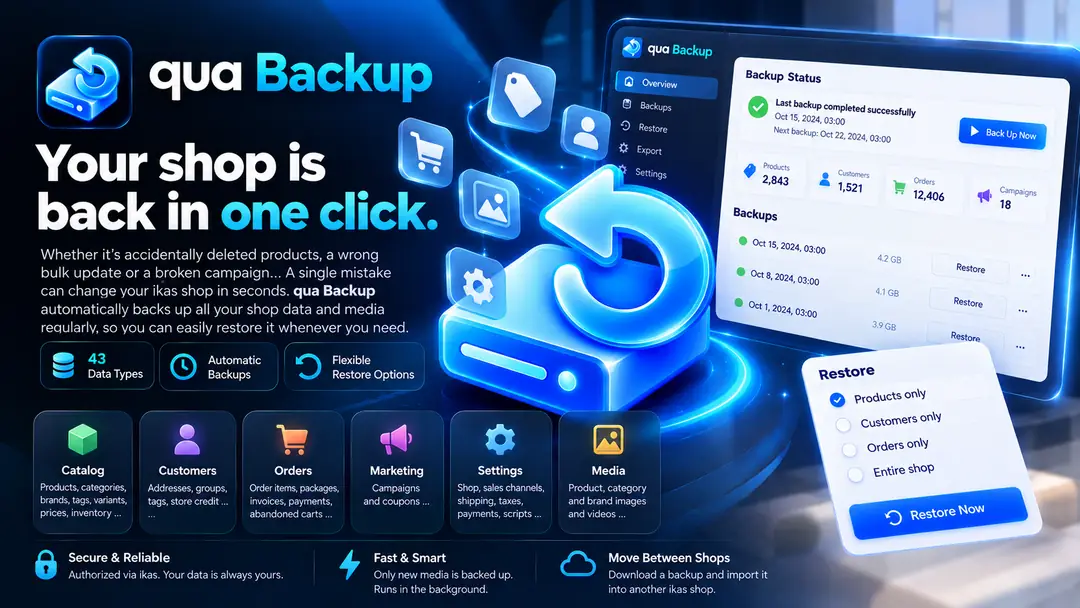
An accidentally deleted product, a faulty bulk update, a broken campaign... One mistake can undo years of work in seconds. qua Backup backs up all of your ikas store's data and images on a regular schedule, so when something goes wrong you can bring your store back the way it was.
Your entire store in one backup
All 43 data types offered by ikas are backed up:
- Catalog: products (variants, prices, stock, SEO, translations), categories, brands, tags, variant types, attributes, price lists
- Customers: addresses, customer groups, tags, store credit
- Orders: line items, packages, invoices, payment transactions, abandoned carts
- Marketing: campaigns and coupons
- Settings: store, sales channel, shipping, tax and payment settings, storefront scripts
- Media: product, category and brand images and videos
It remembers, even when you forget
Turn on scheduled backups once, and your store is backed up automatically every day or every week, at the time you choose and in your own time zone. The latest backups are kept on a rolling basis, and you can pin a backup from an important moment to keep it indefinitely.
Restore exactly what you need
- Restore only products, only customers, or your entire store.
- Stay in control of your existing data with Add and update or Only add missing records.
- Run a dry run to see how many records would be created or updated before anything changes.
- Deleted products come back with the same ID, and restoring the same backup again never creates duplicate records or duplicate orders.
Move from store to store
Download your backup and upload it to another ikas store. Categories and brands are matched by name, products by SKU and customers by email address; matches are updated and anything missing is created. Opening a new store, going live from a test store or moving your brand to a new store: weeks of manual work become a few clicks.
Your data is always yours
- Download the entire backup as a single ZIP file. Large stores are split into parts, and interrupted downloads resume where they left off.
- Export each data type separately as CSV, JSON or NDJSON: open it in Excel, build reports, move it to other systems.
Fast and smart
- Images are not downloaded over and over: only new media is backed up, and an image that appears in dozens of backups is stored once.
- Backups and restores run in the background; leave the panel and check the result whenever you like.
- Every job keeps a step-by-step log and summary, so you always know what was backed up and what was restored.
Security first
- Authorization happens through ikas; your password is never shared with the app.
- Store access tokens are encrypted with AES-256-GCM, and download links are signed and time-limited.
- Each store's data is accessible only to that store; restores and deletions require explicit confirmation.
Right inside your ikas admin panel
No separate account, no new tool to learn: qua Backup runs directly in your ikas admin panel. English, German and Turkish interface, light and dark themes, mobile-friendly design.
Good to know
- Themes, blog and page content, and customer passwords cannot be backed up because they are not available in the ikas Admin API.
- Orders are created as new orders when restored.
- Restoring requires granting the app write permissions.
- Storage space depends on your plan. Manual backups are kept for 7 days; pinned backups are kept indefinitely.
Install today and take your first backup in one click. One day, you will be glad you did.

qua Backup


App Information
Stores with installations
0-50 stores
Release Date
02 October, 2026

Supported Languages
About qua Backup
Your store, back in one click.
An accidentally deleted product, a faulty bulk update, a broken campaign... One mistake can undo years of work in seconds. qua Backup backs up all of your ikas store's data and images on a regular schedule, so when something goes wrong you can bring your store back the way it was.
Your entire store in one backup
All 43 data types offered by ikas are backed up:
- Catalog: products (variants, prices, stock, SEO, translations), categories, brands, tags, variant types, attributes, price lists
- Customers: addresses, customer groups, tags, store credit
- Orders: line items, packages, invoices, payment transactions, abandoned carts
- Marketing: campaigns and coupons
- Settings: store, sales channel, shipping, tax and payment settings, storefront scripts
- Media: product, category and brand images and videos
It remembers, even when you forget
Turn on scheduled backups once, and your store is backed up automatically every day or every week, at the time you choose and in your own time zone. The latest backups are kept on a rolling basis, and you can pin a backup from an important moment to keep it indefinitely.
Restore exactly what you need
- Restore only products, only customers, or your entire store.
- Stay in control of your existing data with Add and update or Only add missing records.
- Run a dry run to see how many records would be created or updated before anything changes.
- Deleted products come back with the same ID, and restoring the same backup again never creates duplicate records or duplicate orders.
Move from store to store
Download your backup and upload it to another ikas store. Categories and brands are matched by name, products by SKU and customers by email address; matches are updated and anything missing is created. Opening a new store, going live from a test store or moving your brand to a new store: weeks of manual work become a few clicks.
Your data is always yours
- Download the entire backup as a single ZIP file. Large stores are split into parts, and interrupted downloads resume where they left off.
- Export each data type separately as CSV, JSON or NDJSON: open it in Excel, build reports, move it to other systems.
Fast and smart
- Images are not downloaded over and over: only new media is backed up, and an image that appears in dozens of backups is stored once.
- Backups and restores run in the background; leave the panel and check the result whenever you like.
- Every job keeps a step-by-step log and summary, so you always know what was backed up and what was restored.
Security first
- Authorization happens through ikas; your password is never shared with the app.
- Store access tokens are encrypted with AES-256-GCM, and download links are signed and time-limited.
- Each store's data is accessible only to that store; restores and deletions require explicit confirmation.
Right inside your ikas admin panel
No separate account, no new tool to learn: qua Backup runs directly in your ikas admin panel. English, German and Turkish interface, light and dark themes, mobile-friendly design.
Good to know
- Themes, blog and page content, and customer passwords cannot be backed up because they are not available in the ikas Admin API.
- Orders are created as new orders when restored.
- Restoring requires granting the app write permissions.
- Storage space depends on your plan. Manual backups are kept for 7 days; pinned backups are kept indefinitely.
Install today and take your first backup in one click. One day, you will be glad you did.
qua Backup
App Information
Stores with installations
0-50 stores
Release Date
02 October, 2026
Supported Languages