About Bulk Find & Replace
Bulk Find & Replace changes a word or phrase across the names, descriptions, meta titles and meta descriptions of the products in your ikas store, or adds a shared text block to descriptions. Nothing is written before a preview: you first see which products will change and how, and apply only after you confirm. You can undo an applied job.
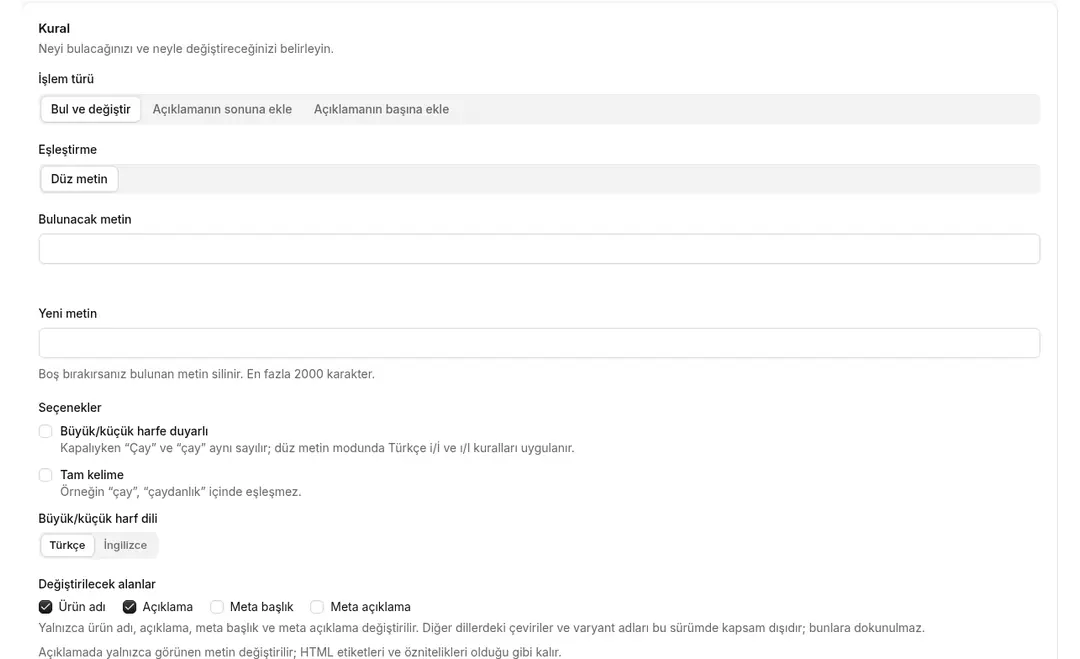
- Three job types: Find and replace text, append to description or prepend to description. Leave the replacement empty to delete the matched text.
- Target fields: Product name, description, meta title and meta description. You choose which fields change.
- Plain text or regular expression: In plain-text mode you can turn case sensitivity and whole-word matching on or off (for example, "tea" does not match inside "teapot"). Turkish İ/ı rules apply in plain-text mode.
- HTML structure is kept: In descriptions only visible text is replaced; HTML tags and attributes stay exactly as they are.
- Adding a text block: Add a block to descriptions as plain text or HTML. Products whose description already contains the same content are skipped, so running the job again does not add the block twice.
- Scope: All products, selected categories, or products you search by name or SKU and pick by hand. Products in subcategories are not included; you can select subcategories separately.
- Preview: See how many products were scanned, will change and will be skipped, and the before/after of each product. The confirmation shows how many products will be updated and how many days old values are kept.
- Runs in the background: The job is queued and products are updated in small batches; you do not have to keep the page open. The progress screen counts changed, skipped and failed products separately; the job detail shows why each product was skipped and the ikas error message.
- Leaves other product data alone: Price, stock, variants, categories and images do not change.
- Undo: Each product's old value is saved before the change is written. Undo restores changed fields to their old values.
- History and CSV log: All applied and undone jobs are listed in the history. Download each job's change log as CSV.
- Out of scope: This version does not change translations in other languages or variant names; they are never touched.
- Turkish and English interface.
Setup
- Install the app in your ikas store and approve the permissions.
- Create a new rule: enter the job type, the text to find and the replacement text (or the block to add).
- Choose the fields to change and the scope (all products, category or hand-picked).
- Start the preview and check the before/after of the products.
- Confirm and apply; follow the progress on the job screen.
- If needed, undo from the job history or download the CSV log.
Plan and trial
- Plan: Pro.
- 7-day free trial (from first install; reinstalling does not restart it).
- If the trial ends without payment, creating rules and starting jobs is locked; you can still view past jobs and their CSV logs.

Bulk Find & Replace


App Information
Stores with installations
0-50 stores
Release Date
29 October, 2026

Supported Languages
About Bulk Find & Replace
Bulk Find & Replace changes a word or phrase across the names, descriptions, meta titles and meta descriptions of the products in your ikas store, or adds a shared text block to descriptions. Nothing is written before a preview: you first see which products will change and how, and apply only after you confirm. You can undo an applied job.
- Three job types: Find and replace text, append to description or prepend to description. Leave the replacement empty to delete the matched text.
- Target fields: Product name, description, meta title and meta description. You choose which fields change.
- Plain text or regular expression: In plain-text mode you can turn case sensitivity and whole-word matching on or off (for example, "tea" does not match inside "teapot"). Turkish İ/ı rules apply in plain-text mode.
- HTML structure is kept: In descriptions only visible text is replaced; HTML tags and attributes stay exactly as they are.
- Adding a text block: Add a block to descriptions as plain text or HTML. Products whose description already contains the same content are skipped, so running the job again does not add the block twice.
- Scope: All products, selected categories, or products you search by name or SKU and pick by hand. Products in subcategories are not included; you can select subcategories separately.
- Preview: See how many products were scanned, will change and will be skipped, and the before/after of each product. The confirmation shows how many products will be updated and how many days old values are kept.
- Runs in the background: The job is queued and products are updated in small batches; you do not have to keep the page open. The progress screen counts changed, skipped and failed products separately; the job detail shows why each product was skipped and the ikas error message.
- Leaves other product data alone: Price, stock, variants, categories and images do not change.
- Undo: Each product's old value is saved before the change is written. Undo restores changed fields to their old values.
- History and CSV log: All applied and undone jobs are listed in the history. Download each job's change log as CSV.
- Out of scope: This version does not change translations in other languages or variant names; they are never touched.
- Turkish and English interface.
Setup
- Install the app in your ikas store and approve the permissions.
- Create a new rule: enter the job type, the text to find and the replacement text (or the block to add).
- Choose the fields to change and the scope (all products, category or hand-picked).
- Start the preview and check the before/after of the products.
- Confirm and apply; follow the progress on the job screen.
- If needed, undo from the job history or download the CSV log.
Plan and trial
- Plan: Pro.
- 7-day free trial (from first install; reinstalling does not restart it).
- If the trial ends without payment, creating rules and starting jobs is locked; you can still view past jobs and their CSV logs.
Bulk Find & Replace
App Information
Stores with installations
0-50 stores
Release Date
29 October, 2026
Supported Languages