About Product Publish Scheduler
Product Publish Scheduler publishes or hides the products you pick on your store at the date and time you set. Plan launches, limited-time sales and season changes without waiting at the admin at that hour. "Hide" hides the product on your store's search and category pages. Product Publish Scheduler does this for you at the time you choose.
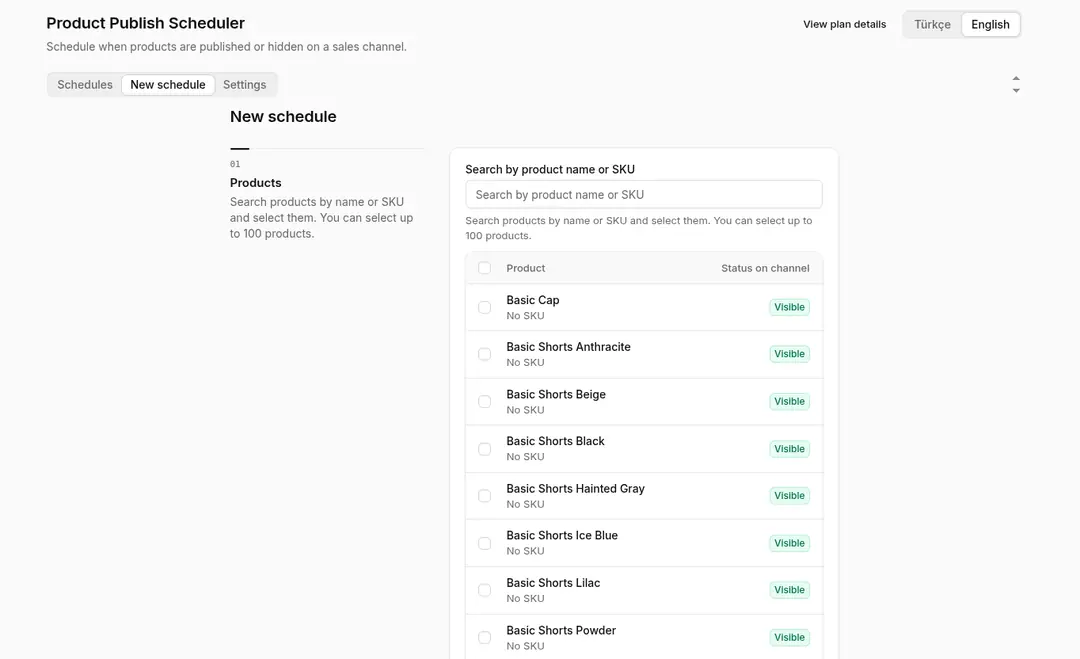
- Create a schedule: Search for a product by name, choose "Publish" or "Hide" and pick the date and time.
- Time windows: Set a window that publishes a product at one time and hides it at a later time, useful for limited-time sales.
- Sales channel: Each schedule applies to one sales channel; the default is your online store.
- Time zone: Times follow the time zone in your ikas store settings. If no time zone is set, the schedule cannot be saved.
- Status tracking: Schedules are listed as Pending, Applied, Failed or Cancelled. You can cancel a schedule while it is pending.
- Reliable runs: Schedules are checked every minute. A missed schedule runs on the next check, failed attempts are retried a limited number of times, and the same schedule is never applied twice.
- Storefront timing: The change is sent to ikas at the scheduled minute; it may take a little longer to show on the storefront because of ikas caching.
- Uninstalling: If you uninstall the app, your products keep their current visibility.
- Permissions: Requests read and write access to product data, used to change product visibility in the store. It also reads basic store information.
- Not in this version: Bulk scheduling by collection or tag, recurring schedules, per-variant or per-market visibility and email alerts are not part of this version.
- Turkish and English interface.
Setup
- Install the app on your ikas store and approve the permissions.
- Check that a time zone is set in your ikas store settings.
- Search for a product, choose the action, date and time, and save the schedule.
- Follow schedule status in the list and cancel pending ones if needed.
Plan and trial
- Plan: Pro.
- 7-day free trial
Product Publish Scheduler


App Information
Stores with installations
0-50 stores
Release Date
31 October, 2026

Supported Languages
About Product Publish Scheduler
Product Publish Scheduler publishes or hides the products you pick on your store at the date and time you set. Plan launches, limited-time sales and season changes without waiting at the admin at that hour. "Hide" hides the product on your store's search and category pages. Product Publish Scheduler does this for you at the time you choose.
- Create a schedule: Search for a product by name, choose "Publish" or "Hide" and pick the date and time.
- Time windows: Set a window that publishes a product at one time and hides it at a later time, useful for limited-time sales.
- Sales channel: Each schedule applies to one sales channel; the default is your online store.
- Time zone: Times follow the time zone in your ikas store settings. If no time zone is set, the schedule cannot be saved.
- Status tracking: Schedules are listed as Pending, Applied, Failed or Cancelled. You can cancel a schedule while it is pending.
- Reliable runs: Schedules are checked every minute. A missed schedule runs on the next check, failed attempts are retried a limited number of times, and the same schedule is never applied twice.
- Storefront timing: The change is sent to ikas at the scheduled minute; it may take a little longer to show on the storefront because of ikas caching.
- Uninstalling: If you uninstall the app, your products keep their current visibility.
- Permissions: Requests read and write access to product data, used to change product visibility in the store. It also reads basic store information.
- Not in this version: Bulk scheduling by collection or tag, recurring schedules, per-variant or per-market visibility and email alerts are not part of this version.
- Turkish and English interface.
Setup
- Install the app on your ikas store and approve the permissions.
- Check that a time zone is set in your ikas store settings.
- Search for a product, choose the action, date and time, and save the schedule.
- Follow schedule status in the list and cancel pending ones if needed.
Plan and trial
- Plan: Pro.
- 7-day free trial
Product Publish Scheduler
App Information
Stores with installations
0-50 stores
Release Date
31 October, 2026
Supported Languages