All Apps
1 / 4
About Campaign Day Readiness Check
Campaign Day Readiness Check scans the products in your campaigns before busy sale days such as 11.11 and Black Friday, and lists price, stock, coupon-limit and shipping cut-off issues by severity. You fix the issues in the ikas admin; the app changes nothing.
- Campaign selection: Pick the campaigns you want to check, or all campaigns that cover a sale period, and start the scan with "Check before campaign".
- Price checks: Flags a zero or negative sell price on an active variant, a discount price that is not below the sell price, a sell price below the buy price, and a missing price in the campaign currency. Products with no buy price are shown as "Check".
- Stock checks: Products with 0 stock that cannot be sold when out of stock are flagged "Out of stock"; products whose stock cannot be read are shown as "Check". You can enter a stock threshold to list products below it. There is no default threshold.
- Coupon and campaign limits: Lists coupons and campaigns whose usage limit is already used up.
- Shipping cut-off: Warns when the shipping cut-off time you enter is empty, already past, or later than the campaign end.
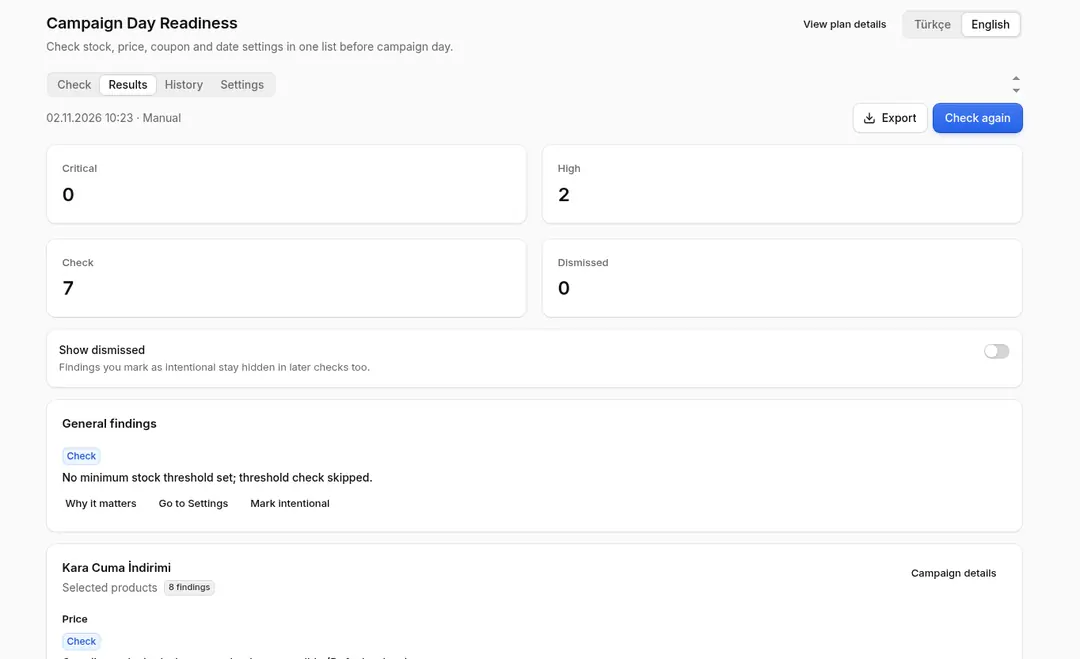
- Severity levels: Each issue is marked Critical, High or Check, so you can see what to fix first.
- Results list: Each row shows the severity, the issue, the campaign, the product, the SKU, the current value and a link to the related page in the ikas admin.
- Row actions: Dismiss a case you left on purpose with "Intentional", and re-scan with "Check again" after you fix something.
- Scheduled check: If you turn it on in Settings, the scan runs again automatically every day at the hour you choose (Türkiye time). Scheduled checks do not run while the app is locked.
- Dynamic categories: Products in campaigns tied to a dynamic category are not resolved one by one; such campaigns are shown as "Check".
- Read-only: It never changes your prices, stock or campaigns.
- Permissions: Requests read-only access to campaign and product data; it also reads basic store information.
- Not in this version: Email alerts and post-campaign reports are not part of this version.
- Turkish and English interface.
Setup
- Install the app on your ikas store and approve the permissions.
- Enter your shipping cut-off time and, if you like, a stock threshold.
- Select the campaigns to check and press "Check before campaign".
- Fix the issues in the ikas admin, starting with Critical rows.
- Use "Check again" to confirm the list is clear.
Plan and trial
- Plan: Pro.
- 7-day free trial
Campaign Day Readiness Check
Installs
0-50 stores
Release date
31 October 2026
Languages
EN · TR
Category
Management
1 / 4
About Campaign Day Readiness Check
Campaign Day Readiness Check scans the products in your campaigns before busy sale days such as 11.11 and Black Friday, and lists price, stock, coupon-limit and shipping cut-off issues by severity. You fix the issues in the ikas admin; the app changes nothing.
- Campaign selection: Pick the campaigns you want to check, or all campaigns that cover a sale period, and start the scan with "Check before campaign".
- Price checks: Flags a zero or negative sell price on an active variant, a discount price that is not below the sell price, a sell price below the buy price, and a missing price in the campaign currency. Products with no buy price are shown as "Check".
- Stock checks: Products with 0 stock that cannot be sold when out of stock are flagged "Out of stock"; products whose stock cannot be read are shown as "Check". You can enter a stock threshold to list products below it. There is no default threshold.
- Coupon and campaign limits: Lists coupons and campaigns whose usage limit is already used up.
- Shipping cut-off: Warns when the shipping cut-off time you enter is empty, already past, or later than the campaign end.
- Severity levels: Each issue is marked Critical, High or Check, so you can see what to fix first.
- Results list: Each row shows the severity, the issue, the campaign, the product, the SKU, the current value and a link to the related page in the ikas admin.
- Row actions: Dismiss a case you left on purpose with "Intentional", and re-scan with "Check again" after you fix something.
- Scheduled check: If you turn it on in Settings, the scan runs again automatically every day at the hour you choose (Türkiye time). Scheduled checks do not run while the app is locked.
- Dynamic categories: Products in campaigns tied to a dynamic category are not resolved one by one; such campaigns are shown as "Check".
- Read-only: It never changes your prices, stock or campaigns.
- Permissions: Requests read-only access to campaign and product data; it also reads basic store information.
- Not in this version: Email alerts and post-campaign reports are not part of this version.
- Turkish and English interface.
Setup
- Install the app on your ikas store and approve the permissions.
- Enter your shipping cut-off time and, if you like, a stock threshold.
- Select the campaigns to check and press "Check before campaign".
- Fix the issues in the ikas admin, starting with Critical rows.
- Use "Check again" to confirm the list is clear.
Plan and trial
- Plan: Pro.
- 7-day free trial
Campaign Day Readiness Check
Installs
0-50 stores
Release date
31 October 2026
Languages
EN · TR
Category
Management
Choose Payment Plan
Shown prices are 1 full month prices. The actual price will be calculated based on the ratio of your store's license days remaining on the payment screen.