About Seenly – Recently Viewed Products
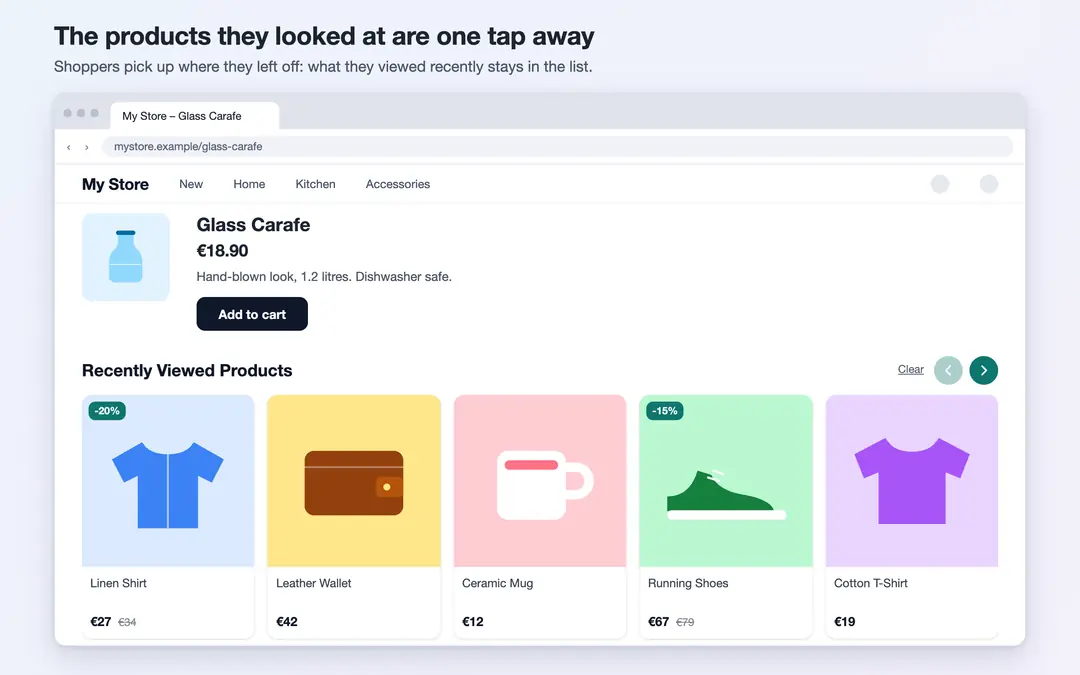
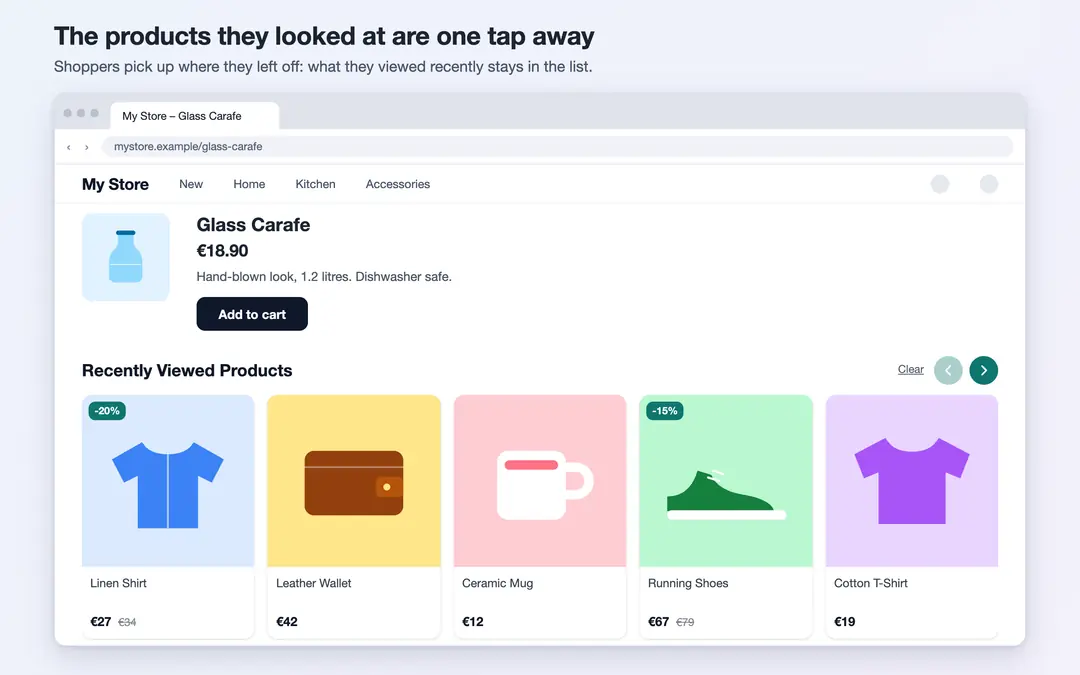
Seenly remembers the products a visitor looked at in your store and shows them again as "Recently viewed products" on the pages you choose. Shoppers find the item they just looked at without searching again and get back to it in one tap. Setup is simple, and it is designed to work comfortably on phones: the list scrolls with a swipe.
Key features
- On the pages you choose: Show it on the home page, product pages, category pages and the cart page, in any combination. On a product page, the product being viewed is left out of the list.
- Specific sections: If you leave it empty, the list appears just above the site footer. Or place it before, after or inside any section of your choice.
- Edge button and drawer: A small button appears at the edge of the screen; a tap opens the recently viewed products in a panel from the side. You choose the button text and its side (left or right).
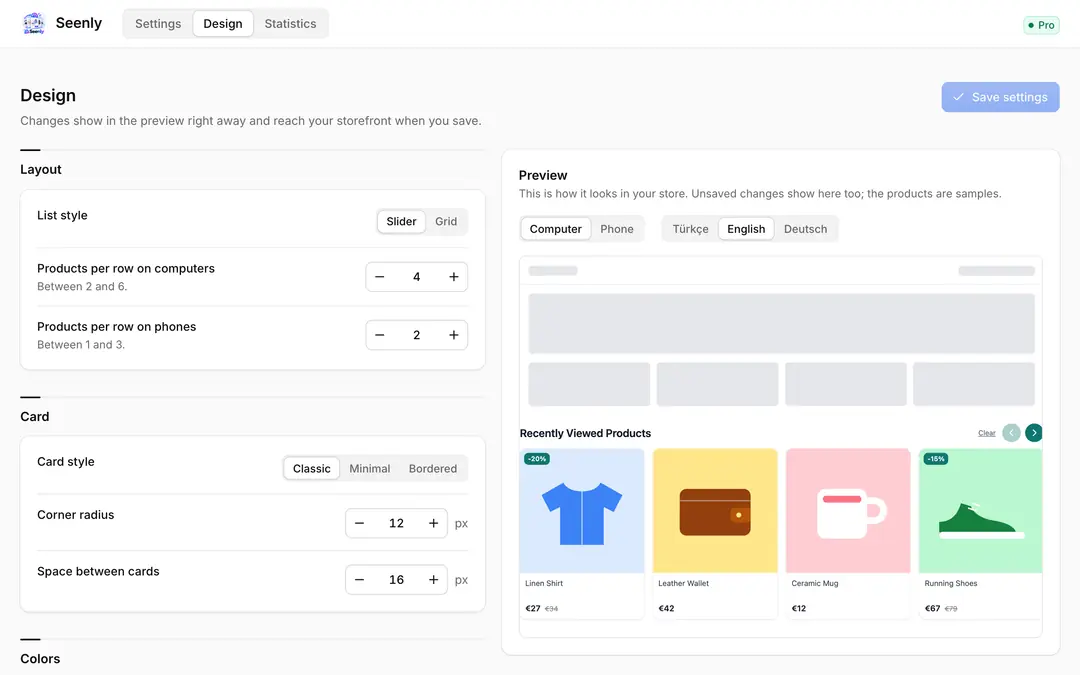
- Slider or grid: Cards scroll horizontally (swipe on phones, arrows on computers) or wrap into rows. Choose how many products per row separately for computers and phones.
- Design: Three card styles, corner radius, spacing, and title, product name, price and accent colors; switch the discount badge, old price and slider arrows on or off. The live preview beside the settings shows the computer and phone views instantly.
- Title: Pick a suggested title or write your own. Turkish, English and German; visitors see the language of the store page.
- Number of products: Show between 4 and 20 products in the list.
- Up-to-date product info: Cards show each product's current name, image and price; products that are deleted, hidden from sale or out of stock drop off the list on their own.
- Visitors can clear it: A "Clear" link on the list lets visitors delete their own list.
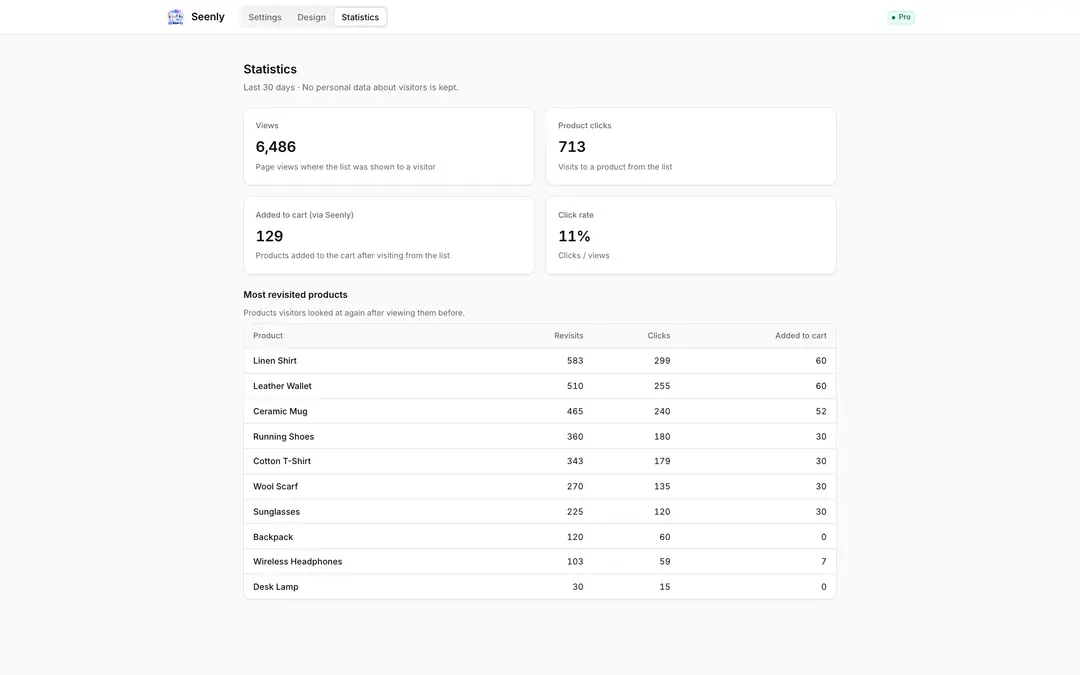
- Statistics: How often the list was seen over the last 30 days, how many products were clicked, how many of those were added to the cart, and the 10 products revisited most.
Privacy
The list of products a visitor looked at is kept only in the browser on their own device; Seenly collects no personal data about visitors and sets no cookies. Statistics consist only of totals and per-product counts.
Pricing
The first 7 days are free, with every feature on. After that, Pro is a paid yearly subscription; the price for your region is shown on the plan. If you don't switch to Pro when the trial ends, Seenly stops on your storefront; your settings are kept.

Seenly – Recently Viewed Products


App Information
Stores with installations
0-50 stores
Release Date
14 October, 2026

Supported Languages
About Seenly – Recently Viewed Products
Seenly remembers the products a visitor looked at in your store and shows them again as "Recently viewed products" on the pages you choose. Shoppers find the item they just looked at without searching again and get back to it in one tap. Setup is simple, and it is designed to work comfortably on phones: the list scrolls with a swipe.
Key features
- On the pages you choose: Show it on the home page, product pages, category pages and the cart page, in any combination. On a product page, the product being viewed is left out of the list.
- Specific sections: If you leave it empty, the list appears just above the site footer. Or place it before, after or inside any section of your choice.
- Edge button and drawer: A small button appears at the edge of the screen; a tap opens the recently viewed products in a panel from the side. You choose the button text and its side (left or right).
- Slider or grid: Cards scroll horizontally (swipe on phones, arrows on computers) or wrap into rows. Choose how many products per row separately for computers and phones.
- Design: Three card styles, corner radius, spacing, and title, product name, price and accent colors; switch the discount badge, old price and slider arrows on or off. The live preview beside the settings shows the computer and phone views instantly.
- Title: Pick a suggested title or write your own. Turkish, English and German; visitors see the language of the store page.
- Number of products: Show between 4 and 20 products in the list.
- Up-to-date product info: Cards show each product's current name, image and price; products that are deleted, hidden from sale or out of stock drop off the list on their own.
- Visitors can clear it: A "Clear" link on the list lets visitors delete their own list.
- Statistics: How often the list was seen over the last 30 days, how many products were clicked, how many of those were added to the cart, and the 10 products revisited most.
Privacy
The list of products a visitor looked at is kept only in the browser on their own device; Seenly collects no personal data about visitors and sets no cookies. Statistics consist only of totals and per-product counts.
Pricing
The first 7 days are free, with every feature on. After that, Pro is a paid yearly subscription; the price for your region is shown on the plan. If you don't switch to Pro when the trial ends, Seenly stops on your storefront; your settings are kept.
Seenly – Recently Viewed Products
App Information
Stores with installations
0-50 stores
Release Date
14 October, 2026
Supported Languages