All Apps
About Ask Seller
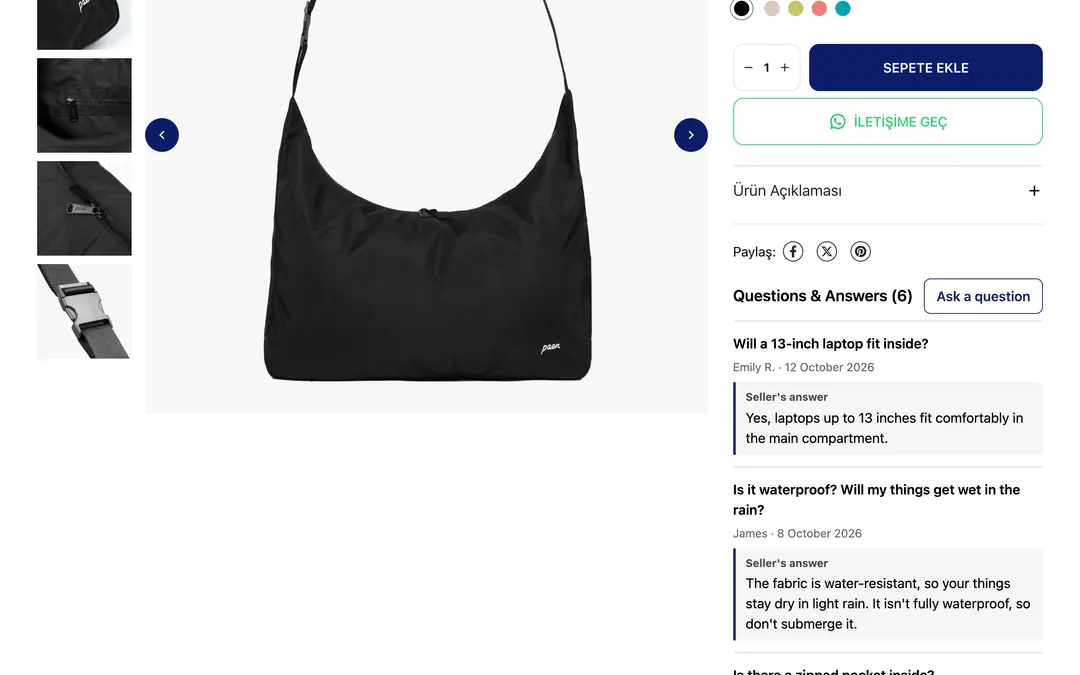
Ask Seller adds an "Ask a question" section to your product pages. Shoppers ask what they want to know right on the product page; you answer from your panel, and the question and your answer are published on that product page.
A question one shopper asks helps everyone looking at the same product. Answered questions build trust, help undecided visitors buy, and cut down the questions you keep getting again and again.
With Ask Seller you can:
- Show an "Ask a question" button and a list of questions with your answers on product pages
- See incoming questions on one screen; answer, reject or delete them
- Open a product's questions from the menu at the top right of the product edit page
- No question goes live until you answer it, so your storefront always stays under your control
- Questions with links and spam are filtered out automatically
- Screen out questions with words you don't want using the word filter
- Choose whether to show the asker's name
- Set the title, accent color and position of the block; it uses your store's fonts and colors
- Works on Turkish, English and German storefronts
Shoppers aren't asked for an email or phone number; a question and an optional name are all it takes.
Pricing
The first 7 days are free, with every feature on and no answer limit. After that, Pro is a paid yearly subscription; the price for your region is shown on the plan. If you don't switch to Pro when the trial ends, the Q&A section isn't shown in your store; your questions, answers and settings are kept.
Ask Seller
Installs
Release date
Languages
Category
About Ask Seller
Ask Seller adds an "Ask a question" section to your product pages. Shoppers ask what they want to know right on the product page; you answer from your panel, and the question and your answer are published on that product page.
A question one shopper asks helps everyone looking at the same product. Answered questions build trust, help undecided visitors buy, and cut down the questions you keep getting again and again.
With Ask Seller you can:
- Show an "Ask a question" button and a list of questions with your answers on product pages
- See incoming questions on one screen; answer, reject or delete them
- Open a product's questions from the menu at the top right of the product edit page
- No question goes live until you answer it, so your storefront always stays under your control
- Questions with links and spam are filtered out automatically
- Screen out questions with words you don't want using the word filter
- Choose whether to show the asker's name
- Set the title, accent color and position of the block; it uses your store's fonts and colors
- Works on Turkish, English and German storefronts
Shoppers aren't asked for an email or phone number; a question and an optional name are all it takes.
Pricing
The first 7 days are free, with every feature on and no answer limit. After that, Pro is a paid yearly subscription; the price for your region is shown on the plan. If you don't switch to Pro when the trial ends, the Q&A section isn't shown in your store; your questions, answers and settings are kept.
Ask Seller
Installs
Release date
Languages
Category