About QuoteMe – Request a Quote
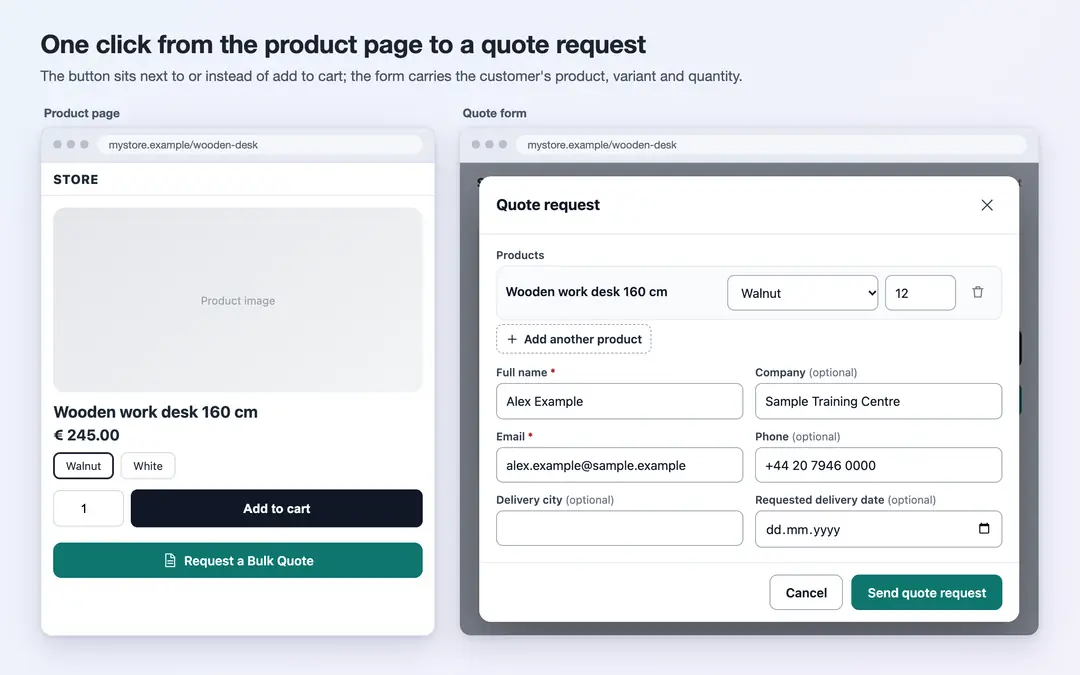
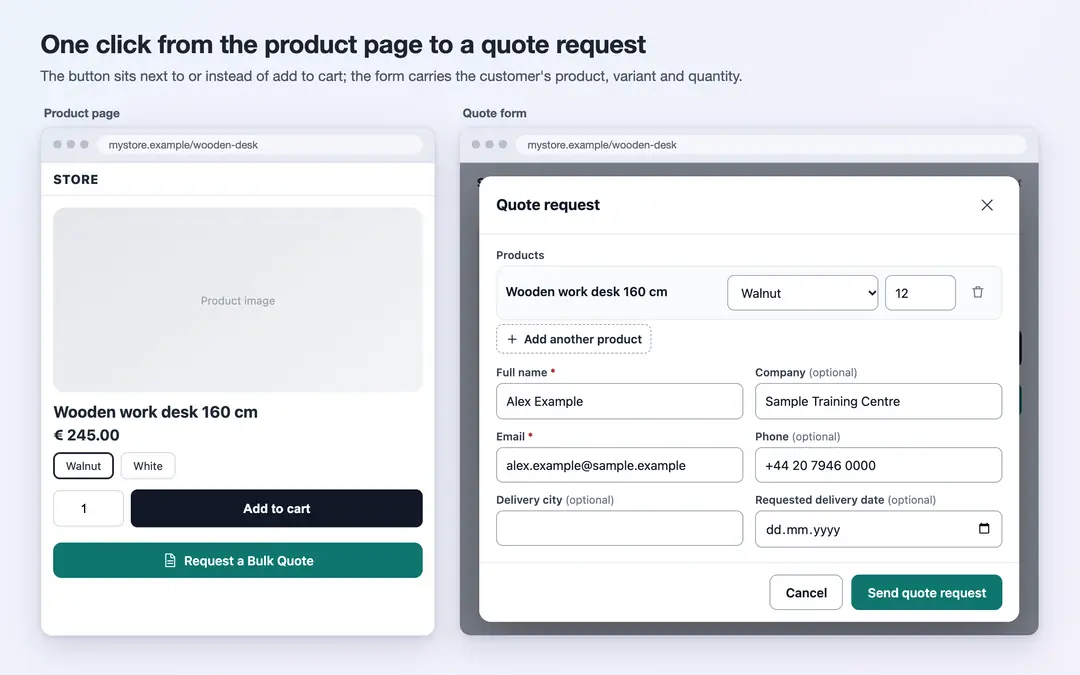
QuoteMe adds a "Request a Quote" button to your store's product pages. When a customer clicks it, a form opens already filled with the product, variant and quantity; they enter their details, optionally attach files such as a drawing or a list, and send the request. Requests are collected as a numbered list inside QuoteMe in your ikas panel, where you track the status, the quoted amount and your notes.
Key features
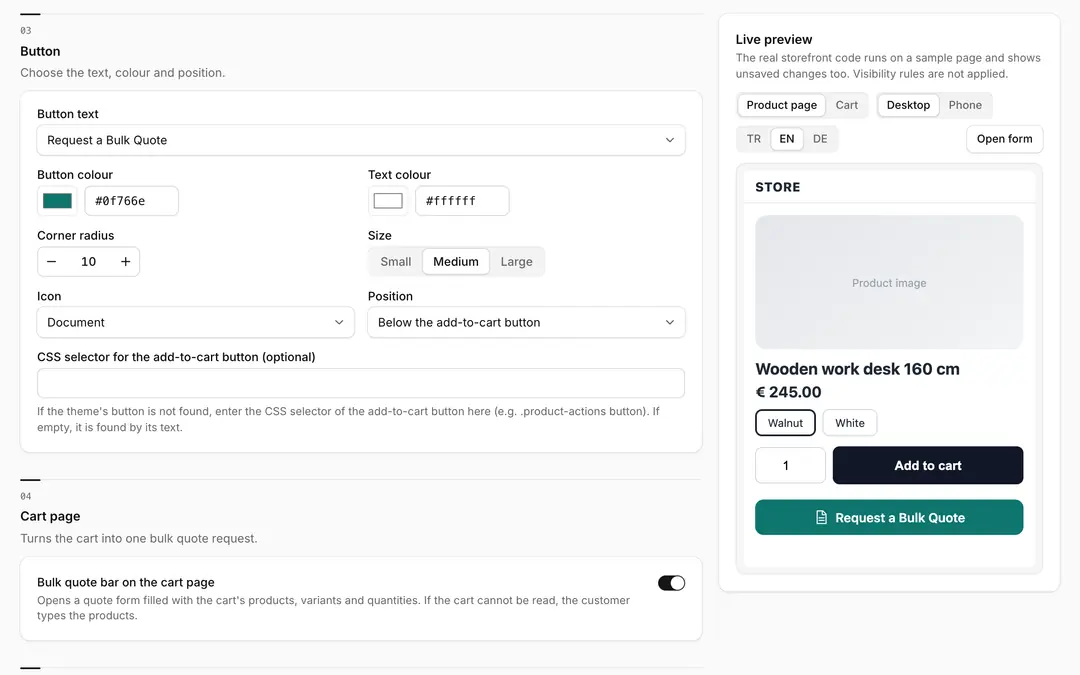
- Button position: Next to, below or instead of the add-to-cart button (add to cart is hidden). If your theme's button is not found, you can give a CSS selector.
- Who sees it: All products, selected products, selected categories (with their subcategories), only out-of-stock products, only products above a price, or selected customer groups. Conditions work together.
- Bulk quote from the cart: A "Request a bulk quote for the items in your cart" bar on the cart page; the form opens filled with the cart's products, variants and quantities.
- Flexible form: Full name, company, email, phone, tax ID, note, file attachments (PDF, JPG, PNG, XLSX, DOCX; up to 3 files, 10 MB each), delivery city and requested delivery date. Turn each field on or off and make it required or optional.
- Spam protection: A hidden trap field and a limit of 5 requests per IP per hour.
- GDPR consent: You write the text; the checkbox is required and the time of consent is stored with the quote.
- In your customer's language: The button and form appear in Turkish, English or German by the language of the store page; you can edit the texts in all three. The button has ready-made texts, colour, corner, size and icon options.
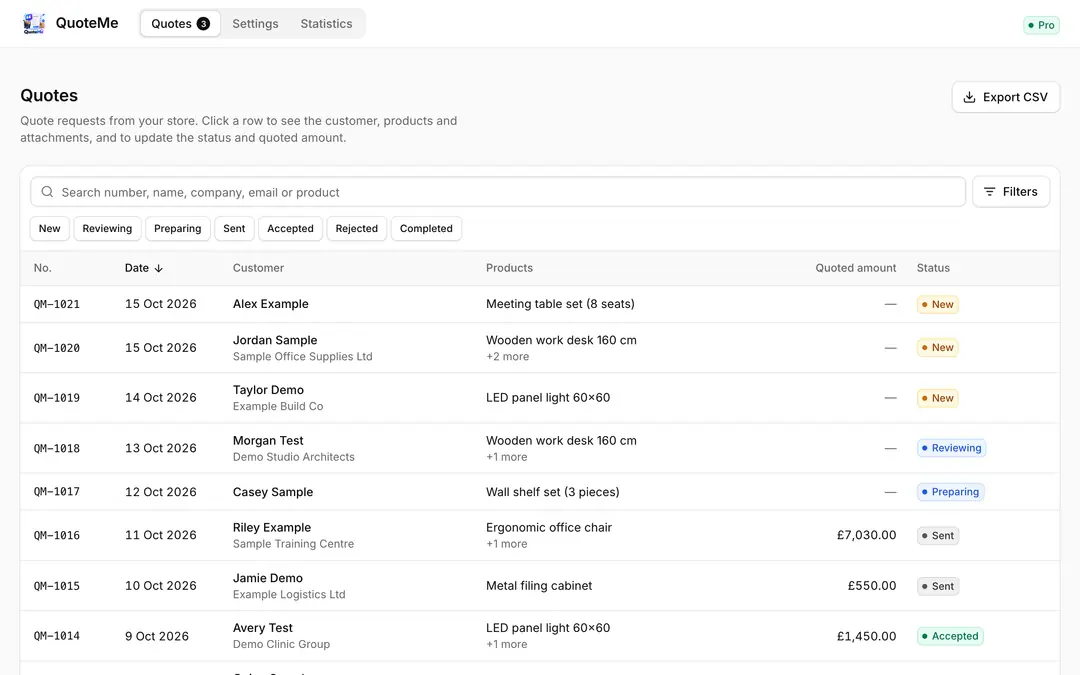
- Tracking quotes: Search and filter by status, date range, product, category, company and customer; CSV export. Statuses: new, reviewing, preparing, sent, accepted, rejected, completed. Internal notes, quoted amount and an order number for "converted to order".
- Live preview: See the button and form on a sample product and cart page, in desktop and phone view, before you save.
- Statistics: Total, new, accepted and converted quotes, the average quoted amount and the most requested products.
Privacy
The form asks only for the fields you turn on; the customer's name, email, phone and tax ID are stored with the quote in the app's database. Your store is the controller of that customer data: write the consent text and decide the retention period to match your own privacy notice. You can permanently delete a quote and its attachments from the panel at any time. Attachments are never at a public address; they open only in the panel, through links valid for 10 minutes. If you uninstall the app, the quotes are deleted after 30 days. QuoteMe sends no automatic emails to customers or to you; you see new quotes in the panel.
Pricing
The first 7 days are free, with every feature on. After that, Pro is a paid yearly subscription; the price for your region is shown on the plan. If you don't switch to Pro when the trial ends, the quote button stops on your storefront; your received quotes and settings are kept.

QuoteMe – Request a Quote


App Information
Stores with installations
0-50 stores
Release Date
15 October, 2026

Supported Languages
About QuoteMe – Request a Quote
QuoteMe adds a "Request a Quote" button to your store's product pages. When a customer clicks it, a form opens already filled with the product, variant and quantity; they enter their details, optionally attach files such as a drawing or a list, and send the request. Requests are collected as a numbered list inside QuoteMe in your ikas panel, where you track the status, the quoted amount and your notes.
Key features
- Button position: Next to, below or instead of the add-to-cart button (add to cart is hidden). If your theme's button is not found, you can give a CSS selector.
- Who sees it: All products, selected products, selected categories (with their subcategories), only out-of-stock products, only products above a price, or selected customer groups. Conditions work together.
- Bulk quote from the cart: A "Request a bulk quote for the items in your cart" bar on the cart page; the form opens filled with the cart's products, variants and quantities.
- Flexible form: Full name, company, email, phone, tax ID, note, file attachments (PDF, JPG, PNG, XLSX, DOCX; up to 3 files, 10 MB each), delivery city and requested delivery date. Turn each field on or off and make it required or optional.
- Spam protection: A hidden trap field and a limit of 5 requests per IP per hour.
- GDPR consent: You write the text; the checkbox is required and the time of consent is stored with the quote.
- In your customer's language: The button and form appear in Turkish, English or German by the language of the store page; you can edit the texts in all three. The button has ready-made texts, colour, corner, size and icon options.
- Tracking quotes: Search and filter by status, date range, product, category, company and customer; CSV export. Statuses: new, reviewing, preparing, sent, accepted, rejected, completed. Internal notes, quoted amount and an order number for "converted to order".
- Live preview: See the button and form on a sample product and cart page, in desktop and phone view, before you save.
- Statistics: Total, new, accepted and converted quotes, the average quoted amount and the most requested products.
Privacy
The form asks only for the fields you turn on; the customer's name, email, phone and tax ID are stored with the quote in the app's database. Your store is the controller of that customer data: write the consent text and decide the retention period to match your own privacy notice. You can permanently delete a quote and its attachments from the panel at any time. Attachments are never at a public address; they open only in the panel, through links valid for 10 minutes. If you uninstall the app, the quotes are deleted after 30 days. QuoteMe sends no automatic emails to customers or to you; you see new quotes in the panel.
Pricing
The first 7 days are free, with every feature on. After that, Pro is a paid yearly subscription; the price for your region is shown on the plan. If you don't switch to Pro when the trial ends, the quote button stops on your storefront; your received quotes and settings are kept.
QuoteMe – Request a Quote
App Information
Stores with installations
0-50 stores
Release Date
15 October, 2026
Supported Languages