About OrderNote – Advanced Order Notes
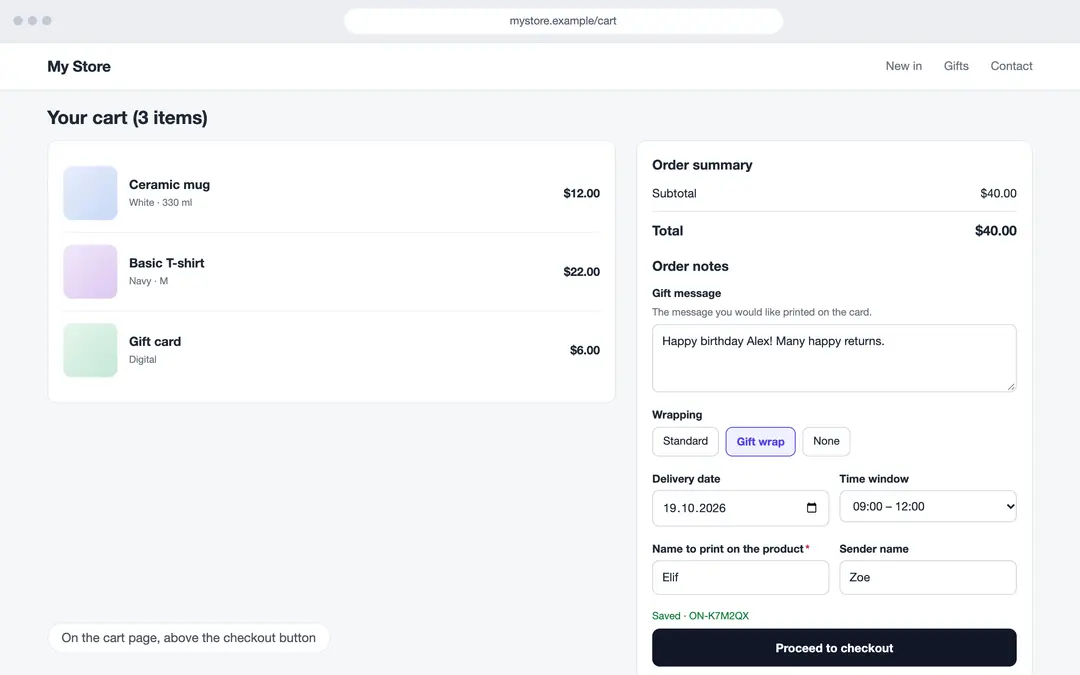
OrderNote asks your customers extra questions about their order in the cart page (or cart drawer): a gift message, delivery date and time window, a name to print on the product, a company order number, a file to upload… The answers are added to the order, written to the order timeline as a readable note, and you see them in one place while you prepare the order.
Key features
- 13 field types: short and long text, number, date, time, date and time, select boxes, dropdown, single choice, checkbox, file, phone and email. Write labels, descriptions and options in Turkish, English and German.
- Ready-made templates: Start with Gift order, Delivery instructions, Custom product or B2B order, then edit them.
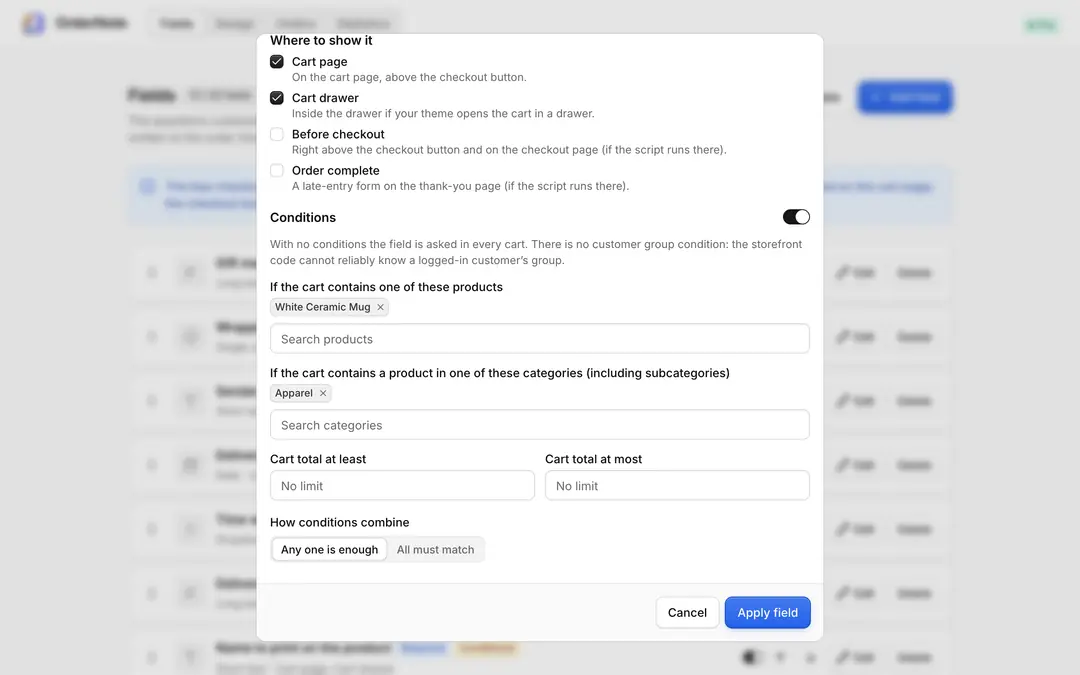
- Conditional fields: Show a field only for certain products, certain categories (including subcategories) or a cart total range, and combine the conditions as "any one is enough" or "all must match".
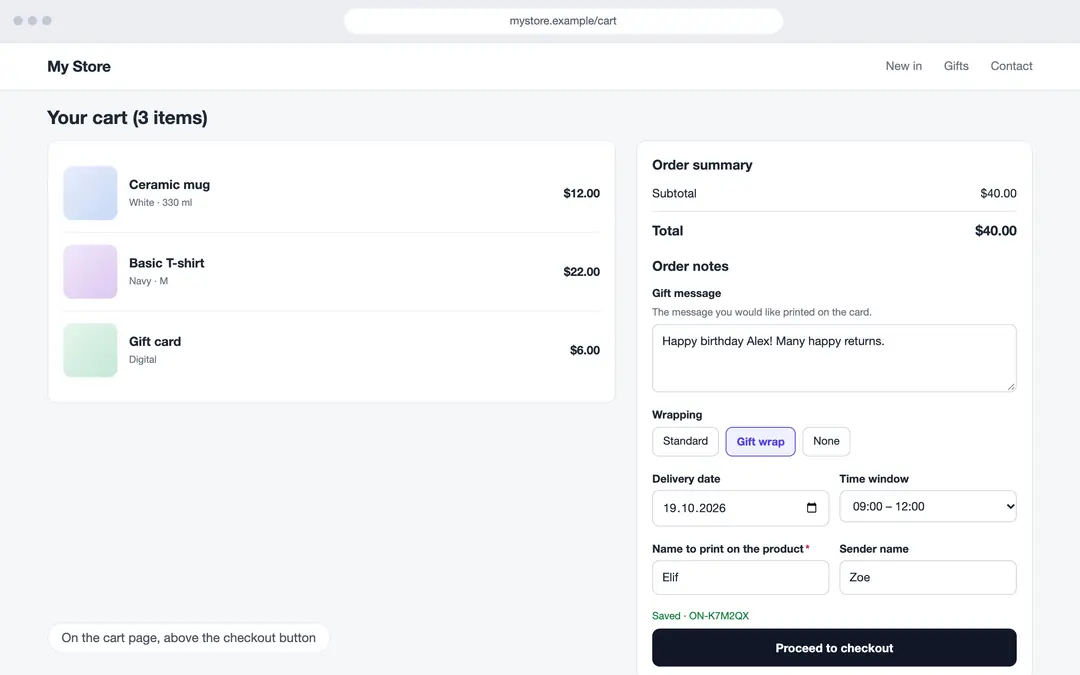
- Required fields: When a required field is empty, the checkout button on the cart page shows a warning. This check only works in the OrderNote form and on the cart page; the ikas checkout page itself cannot be blocked by an app, and the button guard may not work with every theme.
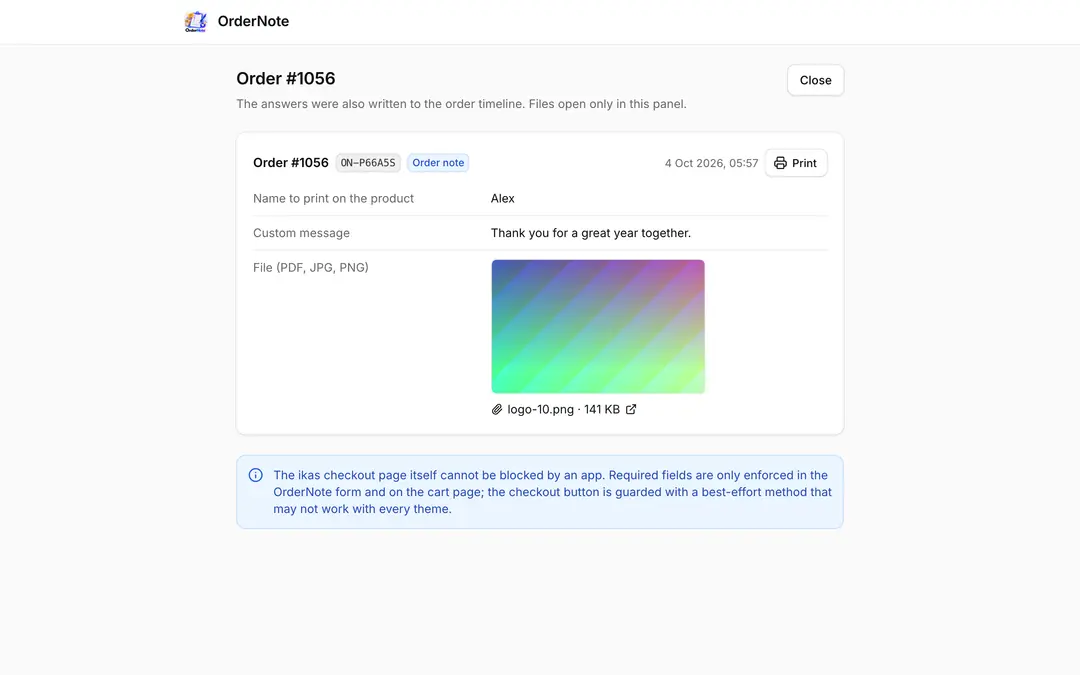
- File uploads: Customers can upload a PDF, JPG or PNG (up to 10 MB); files open only in your panel.
- Drag-and-drop ordering and live preview: Reorder fields by dragging or with the arrow keys; set colours, input style, corner radius and spacing and see the result in a cart page and cart drawer preview (desktop / mobile).
- Orders: Search answers by order number, code or answer text and filter by date and field. Open an order’s answers from the “OrderNote” action on the order page in ikas.
- Printable view: Because ikas print templates cannot be extended, answers are printed from a separate, printer-friendly page (one page per order); you can print several orders together.
- Statistics: How many notes were saved, how many were linked to orders, how much each field was filled, how many files were uploaded.
How do answers reach the order?
ikas hosts the checkout. OrderNote saves the answers under a short code (ON-XXXXXX) and links them to the order in several ways: if your theme offers an order note field on the cart or checkout page, the code is written there; it is also matched through cart/checkout identifiers. Which way works in your store depends on the theme; for records that do not match you can link the code manually from the action on the order page. Unlinked answers are deleted after 14 days, linked ones after 180 days.
Privacy
Answers are kept only on this app’s server; no cookies are set (the browser’s local storage holds only the answer draft). A logged-in customer’s email is not sent to the server; only an irreversible digest calculated in the browser is used for matching.
Pricing
The first 7 days are free, with every feature on. After that, Pro is a paid yearly subscription; the price for your region is shown on the plan. If you don’t switch to Pro when the trial ends, OrderNote stops on your storefront; your fields and the answers on orders are kept.
OrderNote – Advanced Order Notes


App Information
Stores with installations
0-50 stores
Release Date
15 October, 2026

Supported Languages
About OrderNote – Advanced Order Notes
OrderNote asks your customers extra questions about their order in the cart page (or cart drawer): a gift message, delivery date and time window, a name to print on the product, a company order number, a file to upload… The answers are added to the order, written to the order timeline as a readable note, and you see them in one place while you prepare the order.
Key features
- 13 field types: short and long text, number, date, time, date and time, select boxes, dropdown, single choice, checkbox, file, phone and email. Write labels, descriptions and options in Turkish, English and German.
- Ready-made templates: Start with Gift order, Delivery instructions, Custom product or B2B order, then edit them.
- Conditional fields: Show a field only for certain products, certain categories (including subcategories) or a cart total range, and combine the conditions as "any one is enough" or "all must match".
- Required fields: When a required field is empty, the checkout button on the cart page shows a warning. This check only works in the OrderNote form and on the cart page; the ikas checkout page itself cannot be blocked by an app, and the button guard may not work with every theme.
- File uploads: Customers can upload a PDF, JPG or PNG (up to 10 MB); files open only in your panel.
- Drag-and-drop ordering and live preview: Reorder fields by dragging or with the arrow keys; set colours, input style, corner radius and spacing and see the result in a cart page and cart drawer preview (desktop / mobile).
- Orders: Search answers by order number, code or answer text and filter by date and field. Open an order’s answers from the “OrderNote” action on the order page in ikas.
- Printable view: Because ikas print templates cannot be extended, answers are printed from a separate, printer-friendly page (one page per order); you can print several orders together.
- Statistics: How many notes were saved, how many were linked to orders, how much each field was filled, how many files were uploaded.
How do answers reach the order?
ikas hosts the checkout. OrderNote saves the answers under a short code (ON-XXXXXX) and links them to the order in several ways: if your theme offers an order note field on the cart or checkout page, the code is written there; it is also matched through cart/checkout identifiers. Which way works in your store depends on the theme; for records that do not match you can link the code manually from the action on the order page. Unlinked answers are deleted after 14 days, linked ones after 180 days.
Privacy
Answers are kept only on this app’s server; no cookies are set (the browser’s local storage holds only the answer draft). A logged-in customer’s email is not sent to the server; only an irreversible digest calculated in the browser is used for matching.
Pricing
The first 7 days are free, with every feature on. After that, Pro is a paid yearly subscription; the price for your region is shown on the plan. If you don’t switch to Pro when the trial ends, OrderNote stops on your storefront; your fields and the answers on orders are kept.
OrderNote – Advanced Order Notes
App Information
Stores with installations
0-50 stores
Release Date
15 October, 2026
Supported Languages