All Apps
About Product Personalizer
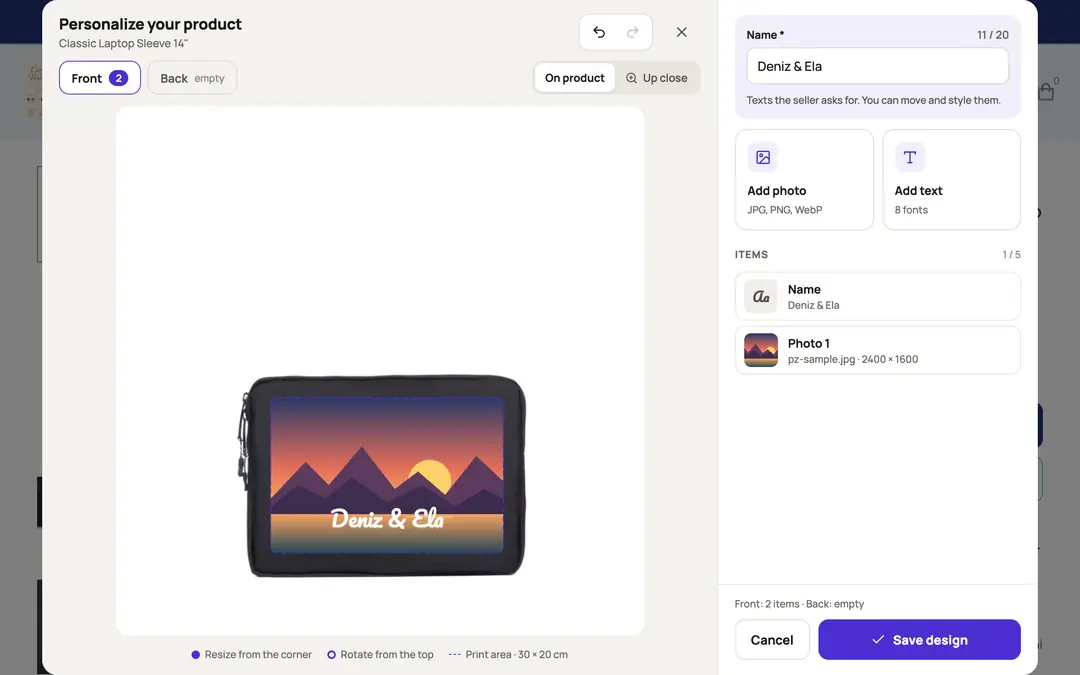
Product Personalizer adds a "Personalize" button to your product pages. Shoppers upload their own photo onto a mug, t-shirt, cap or phone case, add their text, and see the result live on the product. When the order comes in, the print-ready file is waiting for you — no chasing files over email.
For your shoppers:
- Upload a photo, then drag, resize, rotate and center it in one click
- Add text using the fonts and colors you choose
- Design several print areas separately, such as the front and back of a t-shirt
- See the product in the color they picked
- Get a warning when a photo's resolution is too low to print well
For you:
- Draw the print area on your own product photo and enter its real size in millimeters
- Start in seconds with templates for mugs, t-shirts, caps, phone cases, tote bags and pillows
- Decide which fonts and colors can be used, and whether photos or text are allowed
- Download a 300 DPI print file with a transparent background, plus the shopper's original photo, for every order
- Print file links are also added to the order's history and open in one click from the order page
- Works on Turkish, English and German storefronts
The design travels with the order through ikas product options: add a text option (for example "Personalization") to your product once, and the app does the rest. You can also charge extra for that option.
Pricing
The first 7 days are free, with every feature on. After that, Pro is a paid yearly subscription with unlimited personalized orders; the price for your region is shown on the plan. If you don't switch to Pro when the trial ends, the editor no longer shows on your product pages; your settings are kept and you can still download the print files of orders you received.

Product Personalizer
Installs
Release date
Languages
Category
About Product Personalizer
Product Personalizer adds a "Personalize" button to your product pages. Shoppers upload their own photo onto a mug, t-shirt, cap or phone case, add their text, and see the result live on the product. When the order comes in, the print-ready file is waiting for you — no chasing files over email.
For your shoppers:
- Upload a photo, then drag, resize, rotate and center it in one click
- Add text using the fonts and colors you choose
- Design several print areas separately, such as the front and back of a t-shirt
- See the product in the color they picked
- Get a warning when a photo's resolution is too low to print well
For you:
- Draw the print area on your own product photo and enter its real size in millimeters
- Start in seconds with templates for mugs, t-shirts, caps, phone cases, tote bags and pillows
- Decide which fonts and colors can be used, and whether photos or text are allowed
- Download a 300 DPI print file with a transparent background, plus the shopper's original photo, for every order
- Print file links are also added to the order's history and open in one click from the order page
- Works on Turkish, English and German storefronts
The design travels with the order through ikas product options: add a text option (for example "Personalization") to your product once, and the app does the rest. You can also charge extra for that option.
Pricing
The first 7 days are free, with every feature on. After that, Pro is a paid yearly subscription with unlimited personalized orders; the price for your region is shown on the plan. If you don't switch to Pro when the trial ends, the editor no longer shows on your product pages; your settings are kept and you can still download the print files of orders you received.
Product Personalizer
Installs
Release date
Languages
Category