All Apps
About Shipping Countdown by Barlas Dijital
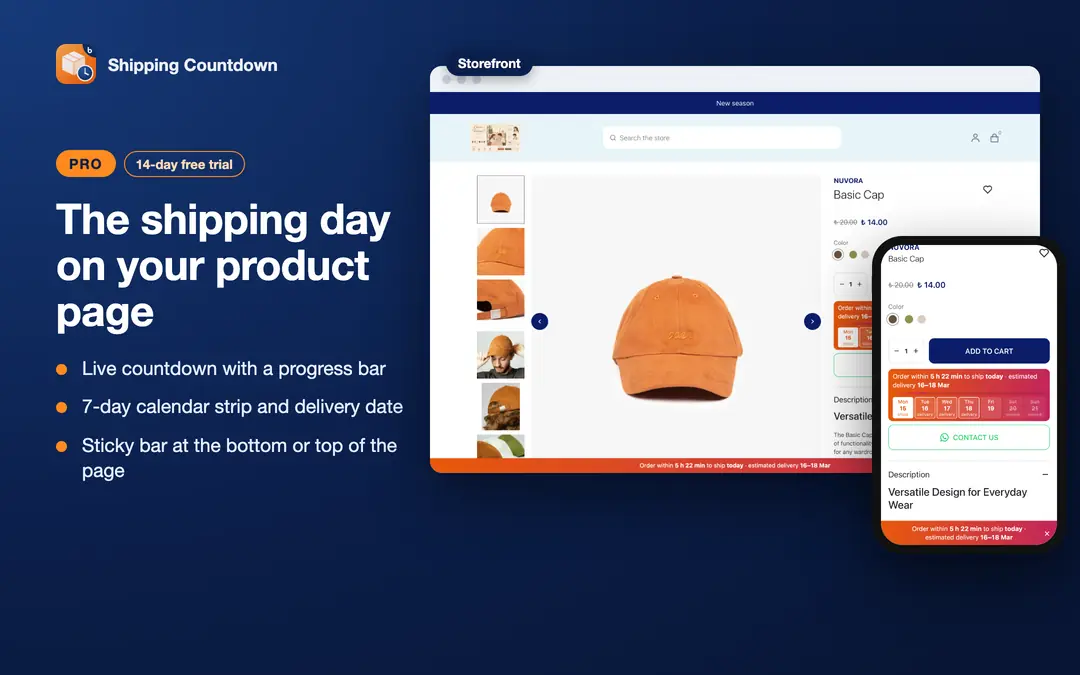
Your customer sees on the product page when the order ships. The countdown uses your shipping hours and closed days. The panel is in English, Turkish, German, French and Dutch.
Free plan:
- One cut-off time for weekdays.
- Saturday and Sunday: each closed or its own time.
- Shipping: the same day, the next day, 2 or 3 days later.
- You add your own closed days. The free plan does not count public holidays. Choose your country and the panel suggests its coming public holidays; you add them with one click.
- The countdown hides on an out-of-stock option.
- The countdown places itself below the add-to-cart button.
- Preview on the storefront, then publish with one button.
- Storefront text in Turkish, English, French and Dutch.
- A small "Barlas Dijital" badge shows under the countdown, on the right. The badge is a link that opens in a new tab.
Pro plan (14-day free trial from the install):
Calendar and holidays
- A cut-off time for each day and a half-day time. Shipping: up to 10 days later.
- Public holidays of the country you choose (Türkiye and 49 European countries), and of your state or region where the country has them. They stay off until you choose a country. Turn each one on or off.
- You also add your own half days. You can name the days you add; the name shows only in the panel.
Look
- 6 looks and corner radius. The new Clock look shows the time in big digit tiles. Your own colour paints the Strip look, the Clock tiles and the progress bar.
- 10 ready colours, gradients and three text sizes.
Message
- Your own sentence; a seconds timer; a last-hour highlight; a progress bar.
- German storefront text.
Delivery and stock
- A delivery date range.
- A 7-day calendar strip under the box, or one line with the shipping and delivery dates.
- A pre-order text or +N days for out-of-stock options that you still sell.
Rules
- Product, tag and category rules: hide the countdown or ship N days later.
- Change a product's rule from its page in the ikas admin.
- Manage rules in bulk with a CSV file.
Placement
- Place it where you want (CSS selector).
- A floating sticky bar at the top or bottom of the page.
- Shipping badges on product cards on listing pages.
- A shipping message on the cart page (Next themes).
Store management
- Settings per storefront.
- In the panel: how often the countdown showed in the last 3 days.
- No badge.
The right time: the countdown uses the server time, not the shopper's device clock.
Shipping Countdown by Barlas Dijital
This app isn't available in this region
Installs
Release date
Languages
Category
Resources and Links
About Shipping Countdown by Barlas Dijital
Your customer sees on the product page when the order ships. The countdown uses your shipping hours and closed days. The panel is in English, Turkish, German, French and Dutch.
Free plan:
- One cut-off time for weekdays.
- Saturday and Sunday: each closed or its own time.
- Shipping: the same day, the next day, 2 or 3 days later.
- You add your own closed days. The free plan does not count public holidays. Choose your country and the panel suggests its coming public holidays; you add them with one click.
- The countdown hides on an out-of-stock option.
- The countdown places itself below the add-to-cart button.
- Preview on the storefront, then publish with one button.
- Storefront text in Turkish, English, French and Dutch.
- A small "Barlas Dijital" badge shows under the countdown, on the right. The badge is a link that opens in a new tab.
Pro plan (14-day free trial from the install):
Calendar and holidays
- A cut-off time for each day and a half-day time. Shipping: up to 10 days later.
- Public holidays of the country you choose (Türkiye and 49 European countries), and of your state or region where the country has them. They stay off until you choose a country. Turn each one on or off.
- You also add your own half days. You can name the days you add; the name shows only in the panel.
Look
- 6 looks and corner radius. The new Clock look shows the time in big digit tiles. Your own colour paints the Strip look, the Clock tiles and the progress bar.
- 10 ready colours, gradients and three text sizes.
Message
- Your own sentence; a seconds timer; a last-hour highlight; a progress bar.
- German storefront text.
Delivery and stock
- A delivery date range.
- A 7-day calendar strip under the box, or one line with the shipping and delivery dates.
- A pre-order text or +N days for out-of-stock options that you still sell.
Rules
- Product, tag and category rules: hide the countdown or ship N days later.
- Change a product's rule from its page in the ikas admin.
- Manage rules in bulk with a CSV file.
Placement
- Place it where you want (CSS selector).
- A floating sticky bar at the top or bottom of the page.
- Shipping badges on product cards on listing pages.
- A shipping message on the cart page (Next themes).
Store management
- Settings per storefront.
- In the panel: how often the countdown showed in the last 3 days.
- No badge.
The right time: the countdown uses the server time, not the shopper's device clock.
Shipping Countdown by Barlas Dijital
This app isn't available in this region
Installs
Release date
Languages
Category
Resources and Links