All Apps
About LabelKit – Shipping & Barcode Labels
LabelKit lets you print shipping labels from your ikas orders and barcode and shelf labels from your products on a thermal printer. It prints directly to Zebra-compatible (ZPL) printers and as a PDF for other thermal printers; 203 and 300 dpi are supported.
Key features
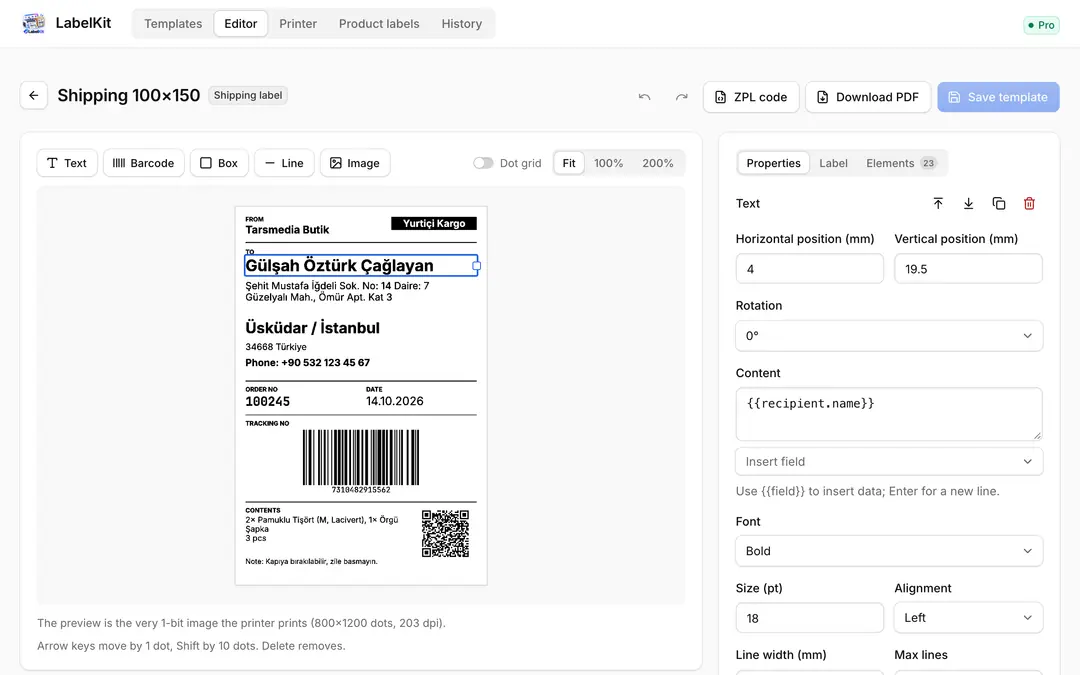
- Shipping labels from orders: Open the label with one click from the ikas order page; the recipient, address, phone, carrier and tracking number barcode fill in automatically.
- Product barcode and price labels: Search products and variants and pick a quantity for each; the product name, SKU, barcode (EAN-13, Code 128) and price are printed.
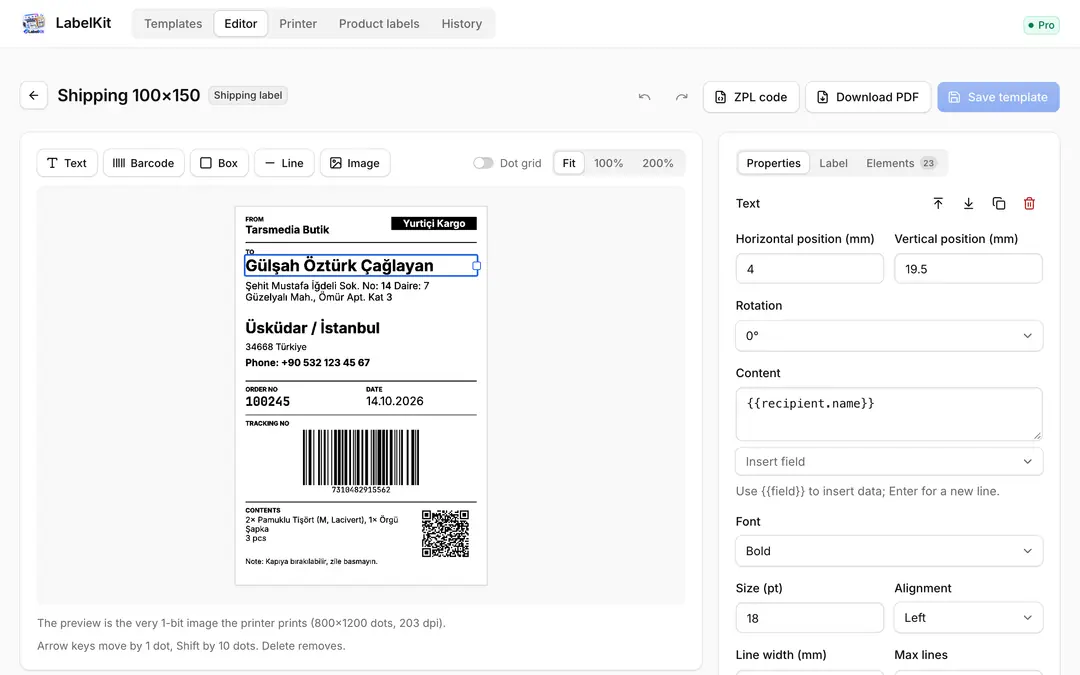
- Visual label editor: Add text, barcodes, QR codes, DataMatrix, boxes, lines and a logo; drag, resize and align to the dot with the arrow keys. The preview is exactly the image the printer prints.
- Ready-made templates: Shipping 100×150 and 100×100, product 50×30 and 40×25, shelf label 58×40 mm; change any of them to suit you.
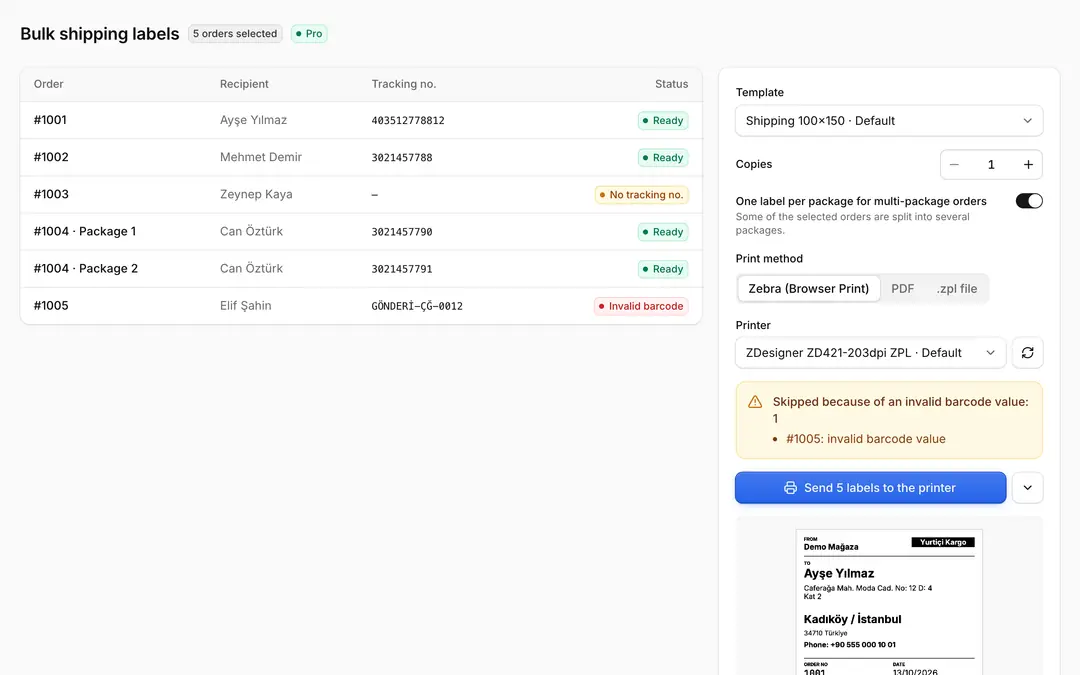
- Bulk printing: Print the labels of the orders you select in the order list in one go; for orders split into several packages, print one label per package. Labels with an invalid barcode are skipped and shown to you.
- Turkish and other special characters just work: The label is sent as an image, so letters like ğ, ş and İ don't depend on the printer's fonts.
- Zebra-compatible printer or PDF: Print directly with Zebra's free Browser Print app; for thermal printers that don't speak ZPL, download a PDF, or a .zpl file if you prefer.
Printing is prepared in your browser; customer details such as the recipient's name and address are not stored on our servers, only when and how many labels were printed is kept in the history.
Pricing
The first 7 days are free, with every feature on. After that, Pro is a paid yearly subscription; the price for your region is shown on the plan. If you don't switch to Pro when the trial ends, label printing stops; your templates and settings are kept.
LabelKit – Shipping & Barcode Labels
Installs
Release date
Languages
Category
About LabelKit – Shipping & Barcode Labels
LabelKit lets you print shipping labels from your ikas orders and barcode and shelf labels from your products on a thermal printer. It prints directly to Zebra-compatible (ZPL) printers and as a PDF for other thermal printers; 203 and 300 dpi are supported.
Key features
- Shipping labels from orders: Open the label with one click from the ikas order page; the recipient, address, phone, carrier and tracking number barcode fill in automatically.
- Product barcode and price labels: Search products and variants and pick a quantity for each; the product name, SKU, barcode (EAN-13, Code 128) and price are printed.
- Visual label editor: Add text, barcodes, QR codes, DataMatrix, boxes, lines and a logo; drag, resize and align to the dot with the arrow keys. The preview is exactly the image the printer prints.
- Ready-made templates: Shipping 100×150 and 100×100, product 50×30 and 40×25, shelf label 58×40 mm; change any of them to suit you.
- Bulk printing: Print the labels of the orders you select in the order list in one go; for orders split into several packages, print one label per package. Labels with an invalid barcode are skipped and shown to you.
- Turkish and other special characters just work: The label is sent as an image, so letters like ğ, ş and İ don't depend on the printer's fonts.
- Zebra-compatible printer or PDF: Print directly with Zebra's free Browser Print app; for thermal printers that don't speak ZPL, download a PDF, or a .zpl file if you prefer.
Printing is prepared in your browser; customer details such as the recipient's name and address are not stored on our servers, only when and how many labels were printed is kept in the history.
Pricing
The first 7 days are free, with every feature on. After that, Pro is a paid yearly subscription; the price for your region is shown on the plan. If you don't switch to Pro when the trial ends, label printing stops; your templates and settings are kept.
LabelKit – Shipping & Barcode Labels
Installs
Release date
Languages
Category