All Apps
About Prova: Virtual Try-On
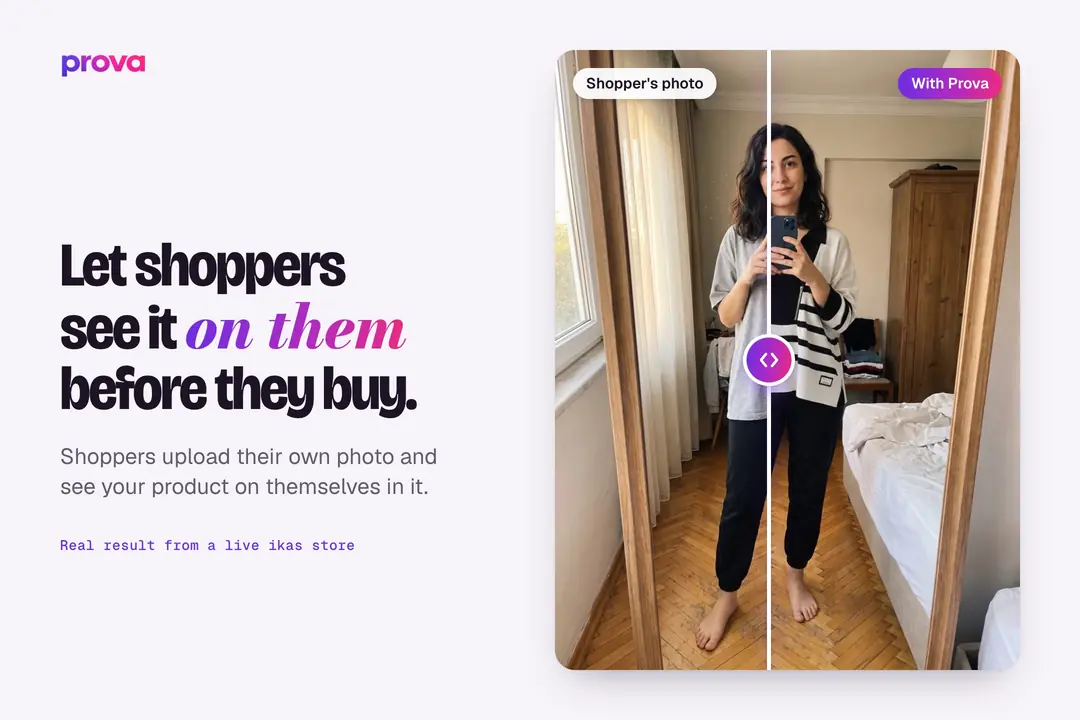
"Will this look good on me?" is the hardest question in online clothing shopping. Prova answers it on the product page. The shopper uploads a photo of themselves and sees the product on them in that photo.
How shoppers try it on
- They tap the Prova button on the product page.
- They pick a full-length photo or a mirror selfie from their gallery and give consent.
- They see the product on themselves. They can switch the scene to see the outfit on the street, at the office, at dinner, at a wedding, on the beach or in a park.
They don't need to download an app or sign up.
For your store
- When you install Prova, the try-on button is added to your store and placed near the add-to-cart button on your theme.
- Each product shows how many people tried it on and liked it, right beside the button.
- The dashboard shows sessions, try-ons, add-to-carts and purchases. Shoppers who try a product on and buy in the same session are counted separately as Prova-driven sales.
- Your most tried-on products are ranked in the dashboard, so you can see which ones bring shoppers to the cart.
- The dashboard opens inside your ikas admin.
Shopper photos
Photos are used only to create the try-on image and are permanently deleted from our servers within 24 hours of upload.
Pricing
Installing is free and your account gets 50 credits. Each try-on and each scene change uses 1 credit. For more, pick a yearly plan with Planı Yönet on Prova's page in the ikas admin; plan credits renew every month and unused credits carry over. If you run out of credits, the button is hidden from your store until you add more.
Install Prova and run your first try-on with one of your own products.

Prova: Virtual Try-On
Installs
Release date
Languages
Category
About Prova: Virtual Try-On
"Will this look good on me?" is the hardest question in online clothing shopping. Prova answers it on the product page. The shopper uploads a photo of themselves and sees the product on them in that photo.
How shoppers try it on
- They tap the Prova button on the product page.
- They pick a full-length photo or a mirror selfie from their gallery and give consent.
- They see the product on themselves. They can switch the scene to see the outfit on the street, at the office, at dinner, at a wedding, on the beach or in a park.
They don't need to download an app or sign up.
For your store
- When you install Prova, the try-on button is added to your store and placed near the add-to-cart button on your theme.
- Each product shows how many people tried it on and liked it, right beside the button.
- The dashboard shows sessions, try-ons, add-to-carts and purchases. Shoppers who try a product on and buy in the same session are counted separately as Prova-driven sales.
- Your most tried-on products are ranked in the dashboard, so you can see which ones bring shoppers to the cart.
- The dashboard opens inside your ikas admin.
Shopper photos
Photos are used only to create the try-on image and are permanently deleted from our servers within 24 hours of upload.
Pricing
Installing is free and your account gets 50 credits. Each try-on and each scene change uses 1 credit. For more, pick a yearly plan with Planı Yönet on Prova's page in the ikas admin; plan credits renew every month and unused credits carry over. If you run out of credits, the button is hidden from your store until you add more.
Install Prova and run your first try-on with one of your own products.
Prova: Virtual Try-On
Installs
Release date
Languages
Category