About 404 Tracking
How many visitors is your store losing?
A deleted product, a changed category address, a mistyped link on someone else's site. The visitor lands on a 404 page and most of them never come back. 404 Track collects those addresses, separates the ones that actually matter and suggests where each should point.
How it works
- Collects. The app installs its own tracking code on your storefront the moment you authorise it. Nothing else to set up.
- Filters. Bot scans are separated from real visitors, so requests hunting for a WordPress panel never clutter your list.
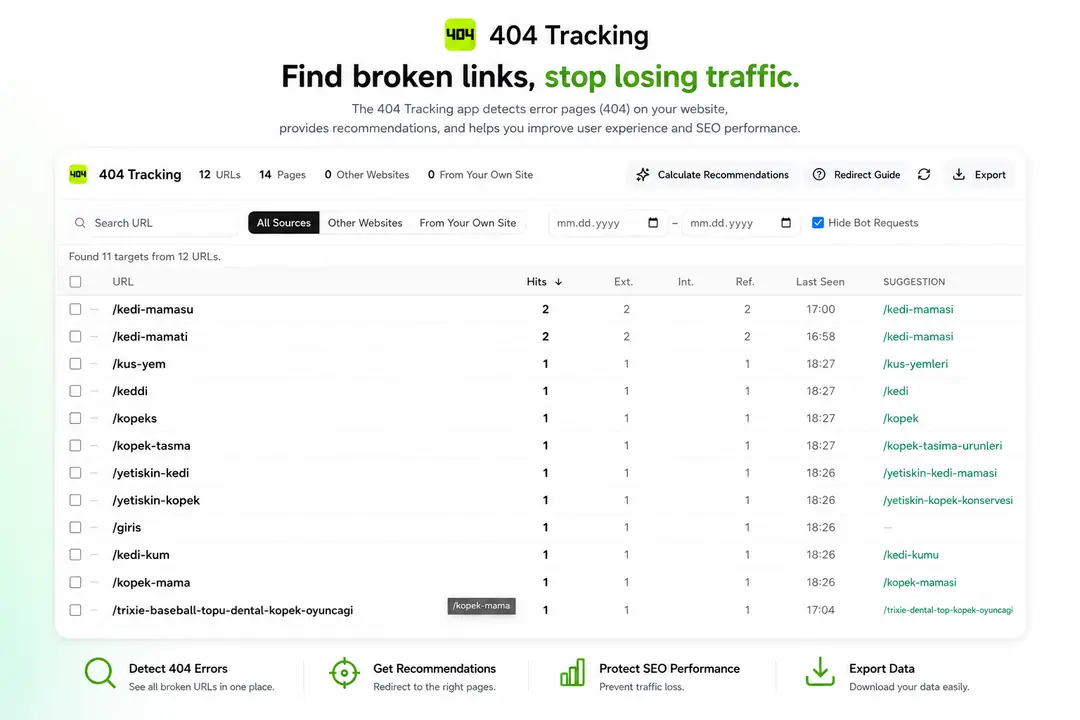
- Suggests. It scans your product, category and brand addresses and finds the closest target for each 404, typos included.
- Prepares. It builds the file the ikas redirect screen expects. Import it and you are done.
It shows where visitors came from
This is the most useful column in the list. A 404 reached from another site means a live page out there links to you, and a redirect keeps both the visitor and the value of that link. A 404 reached from your own site means one of your pages has a broken link, and the right fix there is not a redirect but correcting the link.
Priority, not just a list
On a large store the list runs into thousands of rows. Every address is marked: steady traffic from outside and broken links on your own site rise to the top, while one-off requests and bot scans drop to the bottom. You do not have to hunt for what matters.
It stays quiet when unsure
The suggestion engine produces nothing for weak matches. A wrong redirect is worse than no redirect: it drops the visitor somewhere irrelevant and sends the wrong signal to search engines.
Exports
ikas redirect file (CSV and Excel), a full data dump (CSV) and a printable report (PDF). Whatever filters you applied on screen carry into the file.
Why the last step is yours
The ikas Admin API has no redirect resource, which means no app can create redirects on your behalf. 404 Track does all the work up to that point and you import the file in the ikas admin. A guide inside the app walks you through it screen by screen.
It will not slow your store down
The tracking code is 2.7 KB gzipped. It loads asynchronously and never blocks rendering, so it cannot delay your content from appearing.
- It only sends a report on a page that genuinely returns 404. Everywhere else it just checks and stays silent.
- The same address is reported once per visit, never repeatedly.
- Reports go out through
sendBeacon, which runs off the browser's main thread and does not delay page transitions. - It reads no cookies and touches no browser storage, so it does not pay that cost either.
Data and privacy
The app does not identify your visitors. No cookies, no localStorage, no fingerprint, no identifiers of any kind.
- What is stored: the address that returned 404, the page the visitor came from, and hit counts.
- What is not: IP addresses, browser details, customer data, order data. The database has no column for any of it.
- The app requests only product read and storefront write permissions. It has no access to your orders or customers.
- Every report is signature-verified, so no other store's data can end up in yours.
- Nothing is shared with third parties or sent to advertising or analytics networks.
- Retention: daily breakdowns are kept for 90 days and untouched addresses for 180 days. Records you have assigned a target to are kept indefinitely.
- Uninstall the app and all of your store's data is deleted.

404 Tracking


App Information
Stores with installations
0-50 stores
Release Date
28 August, 2026

Supported Languages
About 404 Tracking
How many visitors is your store losing?
A deleted product, a changed category address, a mistyped link on someone else's site. The visitor lands on a 404 page and most of them never come back. 404 Track collects those addresses, separates the ones that actually matter and suggests where each should point.
How it works
- Collects. The app installs its own tracking code on your storefront the moment you authorise it. Nothing else to set up.
- Filters. Bot scans are separated from real visitors, so requests hunting for a WordPress panel never clutter your list.
- Suggests. It scans your product, category and brand addresses and finds the closest target for each 404, typos included.
- Prepares. It builds the file the ikas redirect screen expects. Import it and you are done.
It shows where visitors came from
This is the most useful column in the list. A 404 reached from another site means a live page out there links to you, and a redirect keeps both the visitor and the value of that link. A 404 reached from your own site means one of your pages has a broken link, and the right fix there is not a redirect but correcting the link.
Priority, not just a list
On a large store the list runs into thousands of rows. Every address is marked: steady traffic from outside and broken links on your own site rise to the top, while one-off requests and bot scans drop to the bottom. You do not have to hunt for what matters.
It stays quiet when unsure
The suggestion engine produces nothing for weak matches. A wrong redirect is worse than no redirect: it drops the visitor somewhere irrelevant and sends the wrong signal to search engines.
Exports
ikas redirect file (CSV and Excel), a full data dump (CSV) and a printable report (PDF). Whatever filters you applied on screen carry into the file.
Why the last step is yours
The ikas Admin API has no redirect resource, which means no app can create redirects on your behalf. 404 Track does all the work up to that point and you import the file in the ikas admin. A guide inside the app walks you through it screen by screen.
It will not slow your store down
The tracking code is 2.7 KB gzipped. It loads asynchronously and never blocks rendering, so it cannot delay your content from appearing.
- It only sends a report on a page that genuinely returns 404. Everywhere else it just checks and stays silent.
- The same address is reported once per visit, never repeatedly.
- Reports go out through
sendBeacon, which runs off the browser's main thread and does not delay page transitions. - It reads no cookies and touches no browser storage, so it does not pay that cost either.
Data and privacy
The app does not identify your visitors. No cookies, no localStorage, no fingerprint, no identifiers of any kind.
- What is stored: the address that returned 404, the page the visitor came from, and hit counts.
- What is not: IP addresses, browser details, customer data, order data. The database has no column for any of it.
- The app requests only product read and storefront write permissions. It has no access to your orders or customers.
- Every report is signature-verified, so no other store's data can end up in yours.
- Nothing is shared with third parties or sent to advertising or analytics networks.
- Retention: daily breakdowns are kept for 90 days and untouched addresses for 180 days. Records you have assigned a target to are kept indefinitely.
- Uninstall the app and all of your store's data is deleted.
404 Tracking
App Information
Stores with installations
0-50 stores
Release Date
28 August, 2026
Supported Languages