About Event & Workshop Tickets
Your event is an ikas product, each session is a variant of it, and capacity is the variant stock. The app keeps session date, time and venue, and issues one ticket per unit from paid orders. The ticket page shows a QR code, session details, the holder's name and a short code for manual entry. At the door, staff open the check-in page with a link and PIN and scan tickets with the phone camera; each ticket can be used once. The app sends no e-mail or SMS.
- Event = ikas product, session = variant, capacity = stock: No separate capacity counter; ikas decrements stock and restores it on cancel.
- Session details: For each session, a start time (required), an optional end time and a venue are set in the admin (Europe/Istanbul). A session without a start time cannot be saved.
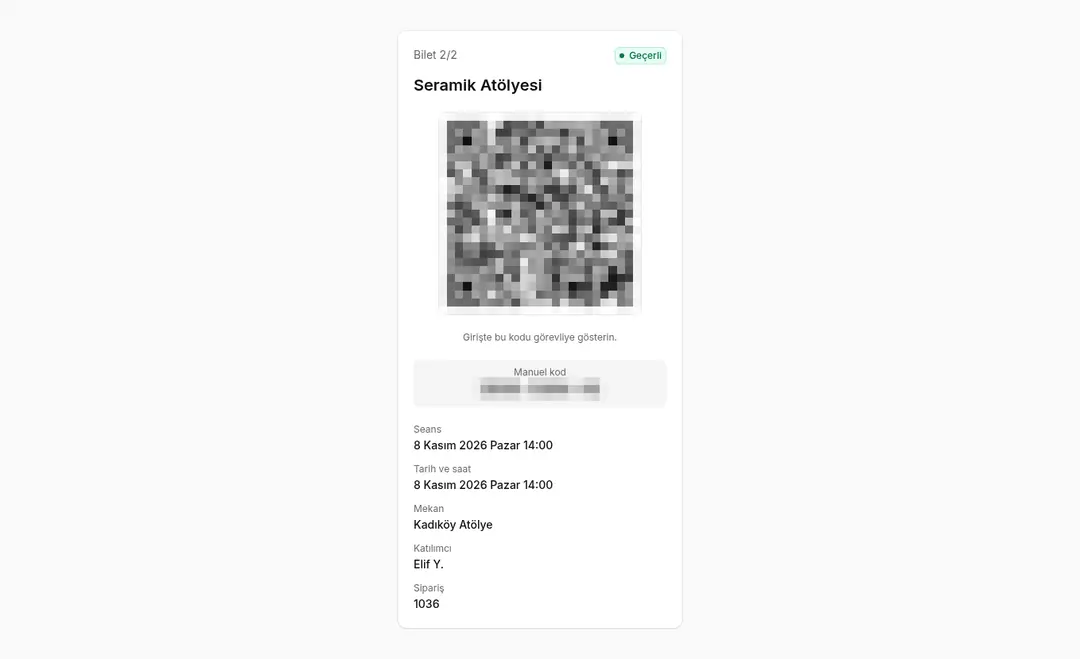
- One ticket per unit: An unguessable signed ticket link and a short manual code. The ticket page shows the QR, event and session, date/time, venue, holder name, "Ticket 1/2", order number and status (Valid / Awaiting payment / Used / Cancelled).
- Unpaid orders: By default, for bank transfer and cash-on-delivery orders the ticket shows "Awaiting payment" and is refused at check-in; it becomes valid when you mark the order as paid in ikas. Workshops that take payment at the door can turn on "Issue tickets before payment" (off by default).
- Where ticket links appear: the thank-you page and the ikas order history (timeline). A guest buyer who closes the thank-you page cannot get back to the link alone; you need to copy it from the order history and forward it.
- Cancel and refund: When an order is cancelled or refunded, its tickets are voided.
- Past sessions are not sellable: A session that has started cannot be selected on the storefront; when a session starts, the app sets its variant stock to 0, so it cannot be bought at checkout.
- Orders placed after a session started: Their tickets are issued as void and the session is flagged "Refund needed" in the admin. The app never cancels the order itself; you refund or cancel it in ikas.
- Staff check-in page: Link + PIN sign-in, camera scan, manual code entry. Each ticket is accepted once; a second scan shows "already used", plus a wrong-session warning and undo within 10 minutes for the same staff access.
- Attendee list: Per event and session, CSV export (UTF-8 with BOM, ; separated, Turkish headers) and a printable list ("Print / PDF").
- Ready on install: Order notifications and the storefront script register themselves on install.
- Personal data: Only the holder's first name and last-name initial are stored; no e-mail or phone.
- Turkish (default) and English. Storefront language follows the page language.
Setup
- Install the app on your ikas store and approve the permissions. The storefront script and order notifications register themselves.
- In ikas, create a product for your event; make each session a variant and enter capacity as the variant stock. Keep "sell when out of stock" off.
- In the app, add the product as an event; sessions are created from its variants. Give each session a start time (required), optionally an end time and a venue.
- Choose whether unpaid orders get valid tickets.
- Create staff access: set a PIN and share the check-in link (shown once) with your staff.
- On event day, staff open the link on a phone, sign in with the PIN and scan tickets. Download the attendee list as CSV or print it.
Plan and trial
- One plan: Pro (yearly, TRY).
- 7-day free trial from install (reinstalling does not restart it).
- Price (Pro): Türkiye ₺2.500/year; Europe €5/month or €45/year; Americas, Asia, Africa, Oceania $5/month or $50/year.
- If the trial ends without payment, the admin shows a lock screen, the storefront turns off (no thank-you box), and ticket issuing and check-in stop. Existing ticket pages stay readable. After payment, tickets for orders paid during the lock are issued.

Event & Workshop Tickets


App Information
Stores with installations
0-50 stores
Release Date
21 October, 2026

Supported Languages
About Event & Workshop Tickets
Your event is an ikas product, each session is a variant of it, and capacity is the variant stock. The app keeps session date, time and venue, and issues one ticket per unit from paid orders. The ticket page shows a QR code, session details, the holder's name and a short code for manual entry. At the door, staff open the check-in page with a link and PIN and scan tickets with the phone camera; each ticket can be used once. The app sends no e-mail or SMS.
- Event = ikas product, session = variant, capacity = stock: No separate capacity counter; ikas decrements stock and restores it on cancel.
- Session details: For each session, a start time (required), an optional end time and a venue are set in the admin (Europe/Istanbul). A session without a start time cannot be saved.
- One ticket per unit: An unguessable signed ticket link and a short manual code. The ticket page shows the QR, event and session, date/time, venue, holder name, "Ticket 1/2", order number and status (Valid / Awaiting payment / Used / Cancelled).
- Unpaid orders: By default, for bank transfer and cash-on-delivery orders the ticket shows "Awaiting payment" and is refused at check-in; it becomes valid when you mark the order as paid in ikas. Workshops that take payment at the door can turn on "Issue tickets before payment" (off by default).
- Where ticket links appear: the thank-you page and the ikas order history (timeline). A guest buyer who closes the thank-you page cannot get back to the link alone; you need to copy it from the order history and forward it.
- Cancel and refund: When an order is cancelled or refunded, its tickets are voided.
- Past sessions are not sellable: A session that has started cannot be selected on the storefront; when a session starts, the app sets its variant stock to 0, so it cannot be bought at checkout.
- Orders placed after a session started: Their tickets are issued as void and the session is flagged "Refund needed" in the admin. The app never cancels the order itself; you refund or cancel it in ikas.
- Staff check-in page: Link + PIN sign-in, camera scan, manual code entry. Each ticket is accepted once; a second scan shows "already used", plus a wrong-session warning and undo within 10 minutes for the same staff access.
- Attendee list: Per event and session, CSV export (UTF-8 with BOM, ; separated, Turkish headers) and a printable list ("Print / PDF").
- Ready on install: Order notifications and the storefront script register themselves on install.
- Personal data: Only the holder's first name and last-name initial are stored; no e-mail or phone.
- Turkish (default) and English. Storefront language follows the page language.
Setup
- Install the app on your ikas store and approve the permissions. The storefront script and order notifications register themselves.
- In ikas, create a product for your event; make each session a variant and enter capacity as the variant stock. Keep "sell when out of stock" off.
- In the app, add the product as an event; sessions are created from its variants. Give each session a start time (required), optionally an end time and a venue.
- Choose whether unpaid orders get valid tickets.
- Create staff access: set a PIN and share the check-in link (shown once) with your staff.
- On event day, staff open the link on a phone, sign in with the PIN and scan tickets. Download the attendee list as CSV or print it.
Plan and trial
- One plan: Pro (yearly, TRY).
- 7-day free trial from install (reinstalling does not restart it).
- Price (Pro): Türkiye ₺2.500/year; Europe €5/month or €45/year; Americas, Asia, Africa, Oceania $5/month or $50/year.
- If the trial ends without payment, the admin shows a lock screen, the storefront turns off (no thank-you box), and ticket issuing and check-in stop. Existing ticket pages stay readable. After payment, tickets for orders paid during the lock are issued.
Event & Workshop Tickets
App Information
Stores with installations
0-50 stores
Release Date
21 October, 2026
Supported Languages