All Apps
About Spotly – Option Preview
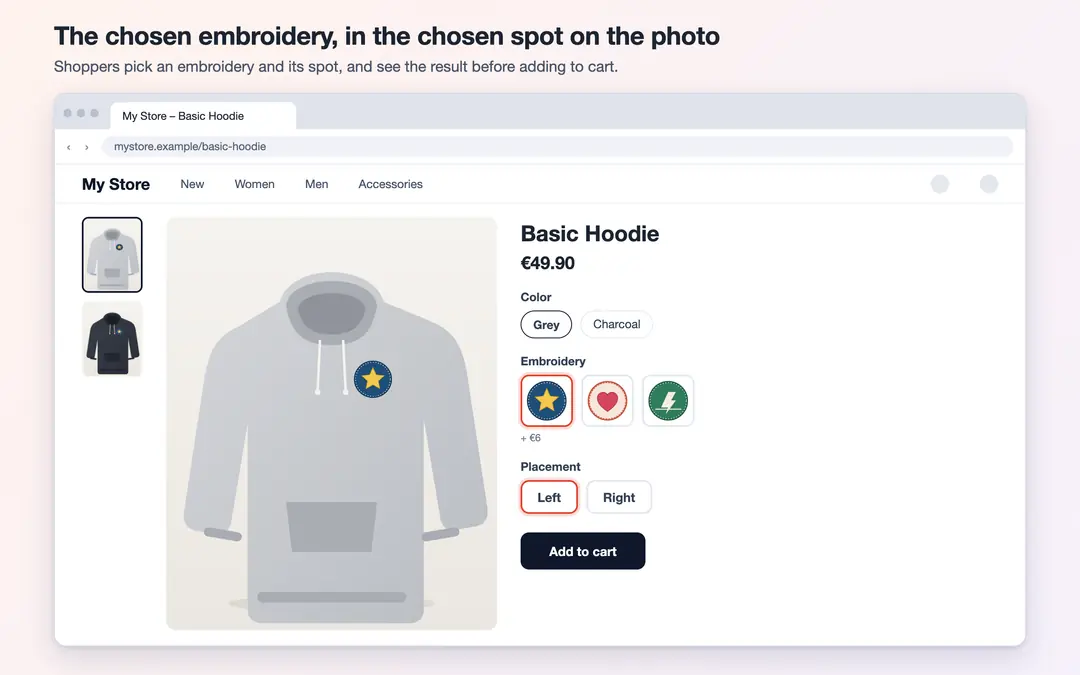
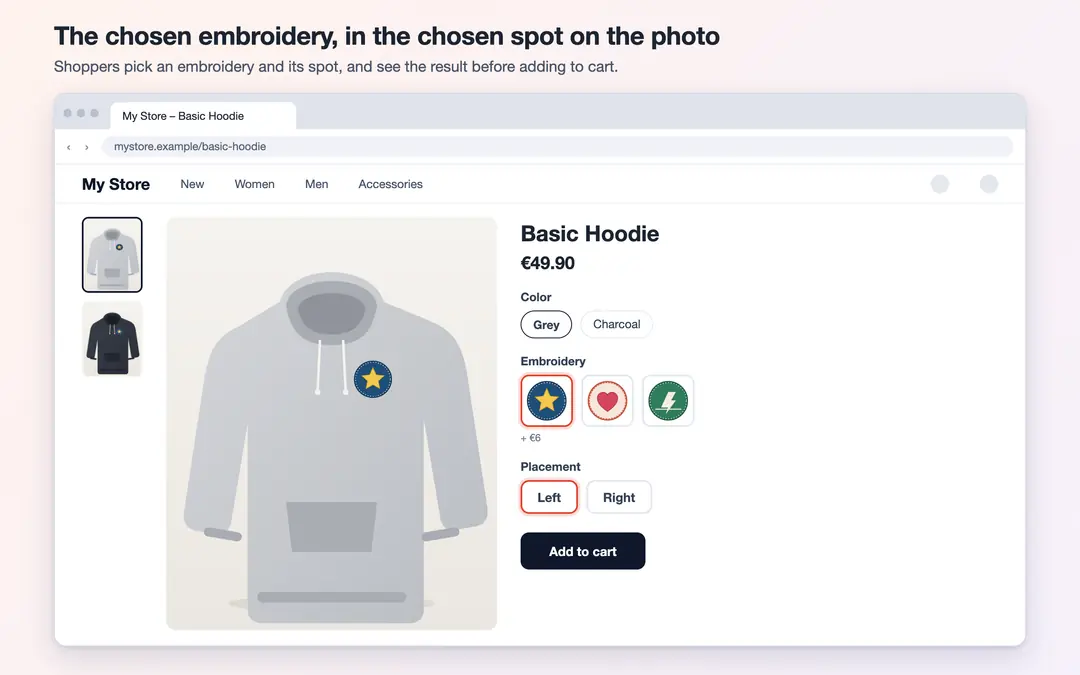
If you have added embroidery, print or patch options to your product with ikas product personalization, Spotly shows the image the shopper picks right on the product photo. As the shopper changes the embroidery or its spot, the photo changes too, so they see the result before adding to cart. If you sell hoodies, for example, the shopper picks an embroidery, picks "Left" or "Right" and sees the embroidery on the photo in that spot.
How it works
- The choices come from the product personalization in ikas. Spotly adds no new option and writes nothing to the order; the shopper's choice reaches your order as usual.
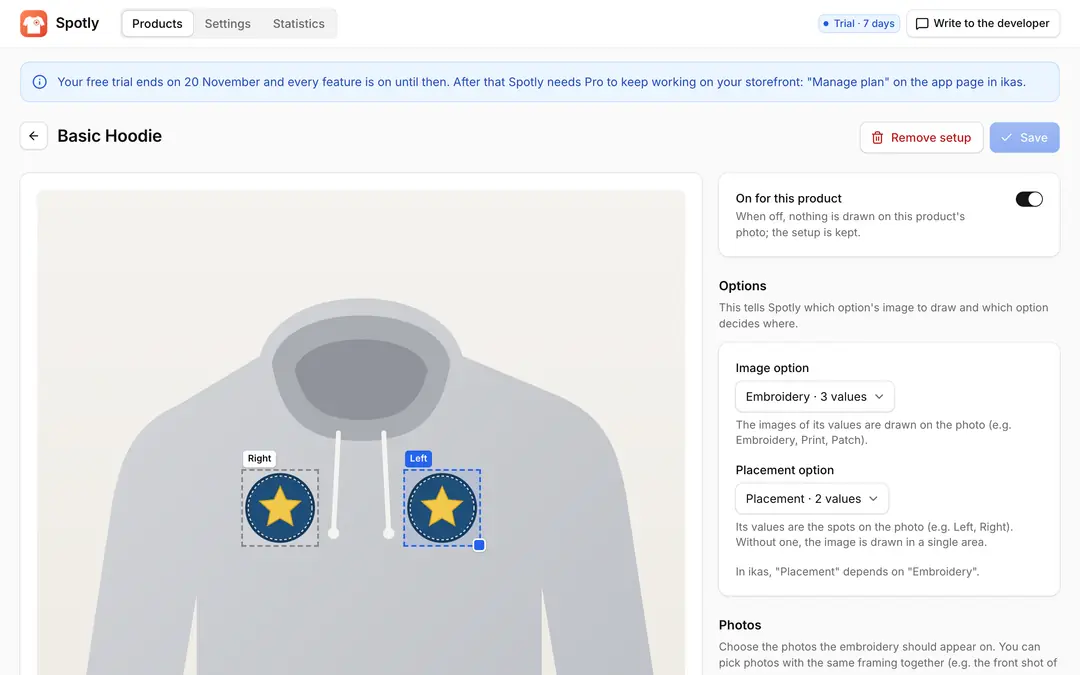
- Pick a product in the panel. Spotly suggests the option with images (e.g. Embroidery) and the placement option that depends on it (e.g. Placement).
- Mark each spot on the plain product photo with a box: drag it and resize it from its corner. Embroideries are fitted inside the box without stretching, and you see the chosen embroidery live inside the box while marking.
Highlights
- Several spots: Left chest, right chest, back, hem and as many more as you need. Without a placement option the image is shown in a single area.
- Photos with the same framing: Pick photos with the same framing together, such as the front shot of each color; your spots are drawn on all of them at the same proportions.
- Hide white background: The white background of the embroidery image disappears on light products.
- Thumbnails: Optionally shown on the small photos under the gallery too.
- Fits your theme: Spotly recognizes the option boxes on the product page by itself (image, color and text boxes and dropdowns). If your theme is not recognized, enter your theme's box selector and selected class in the advanced settings.
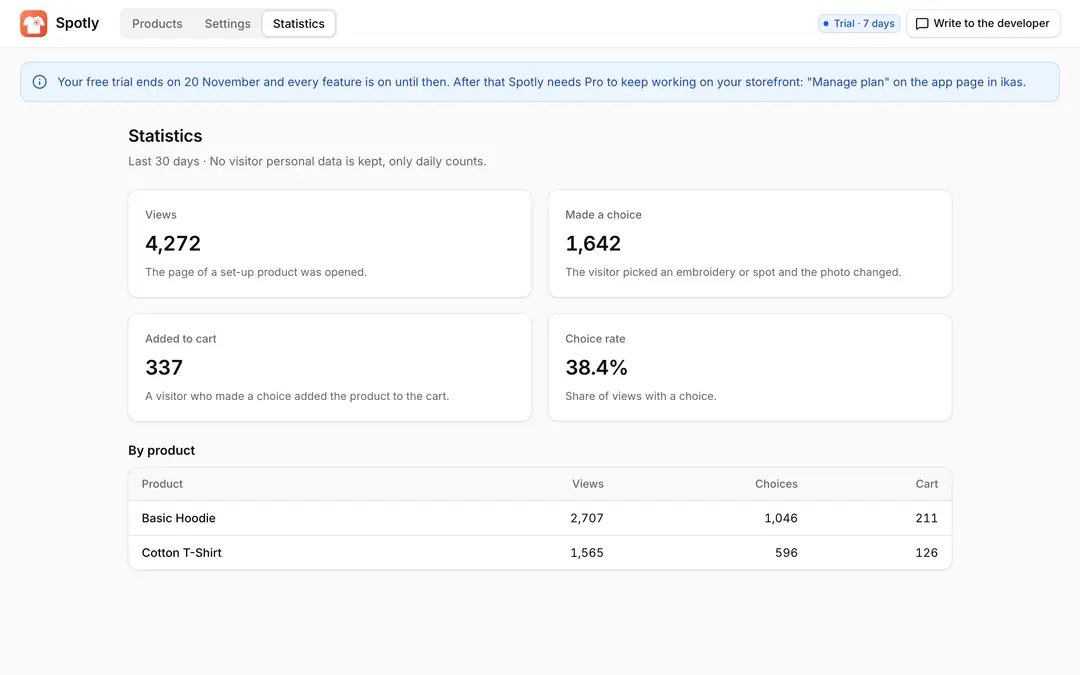
- Statistics: For the last 30 days, per product: how often set-up products were viewed, how many visitors made a choice and how many of them added the product to the cart.
Privacy
Spotly collects no visitor personal data and sets no cookies. Statistics are daily totals only.
Price
Free for the first 7 days with every feature on. After that, the Pro plan is billed yearly. If you do not switch to Pro when the trial ends, Spotly stops on your storefront; your setups are kept.

Spotly – Option Preview
Installs
Release date
Languages
Category
About Spotly – Option Preview
If you have added embroidery, print or patch options to your product with ikas product personalization, Spotly shows the image the shopper picks right on the product photo. As the shopper changes the embroidery or its spot, the photo changes too, so they see the result before adding to cart. If you sell hoodies, for example, the shopper picks an embroidery, picks "Left" or "Right" and sees the embroidery on the photo in that spot.
How it works
- The choices come from the product personalization in ikas. Spotly adds no new option and writes nothing to the order; the shopper's choice reaches your order as usual.
- Pick a product in the panel. Spotly suggests the option with images (e.g. Embroidery) and the placement option that depends on it (e.g. Placement).
- Mark each spot on the plain product photo with a box: drag it and resize it from its corner. Embroideries are fitted inside the box without stretching, and you see the chosen embroidery live inside the box while marking.
Highlights
- Several spots: Left chest, right chest, back, hem and as many more as you need. Without a placement option the image is shown in a single area.
- Photos with the same framing: Pick photos with the same framing together, such as the front shot of each color; your spots are drawn on all of them at the same proportions.
- Hide white background: The white background of the embroidery image disappears on light products.
- Thumbnails: Optionally shown on the small photos under the gallery too.
- Fits your theme: Spotly recognizes the option boxes on the product page by itself (image, color and text boxes and dropdowns). If your theme is not recognized, enter your theme's box selector and selected class in the advanced settings.
- Statistics: For the last 30 days, per product: how often set-up products were viewed, how many visitors made a choice and how many of them added the product to the cart.
Privacy
Spotly collects no visitor personal data and sets no cookies. Statistics are daily totals only.
Price
Free for the first 7 days with every feature on. After that, the Pro plan is billed yearly. If you do not switch to Pro when the trial ends, Spotly stops on your storefront; your setups are kept.
Spotly – Option Preview
Installs
Release date
Languages
Category