All Apps
About Kabin – AI Virtual Try-On
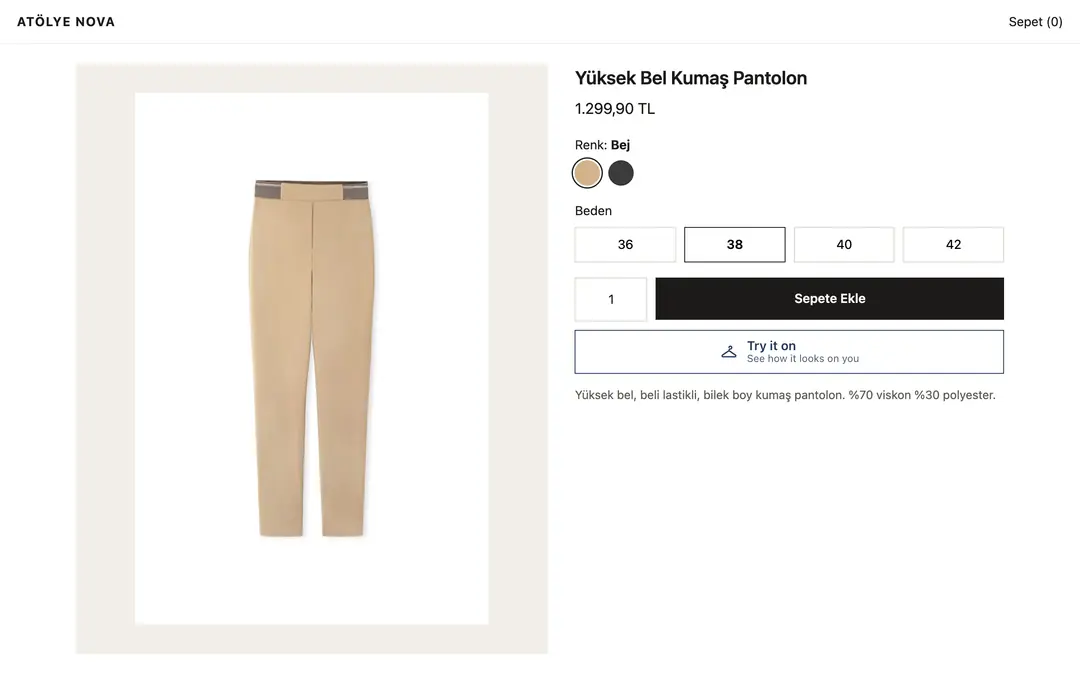
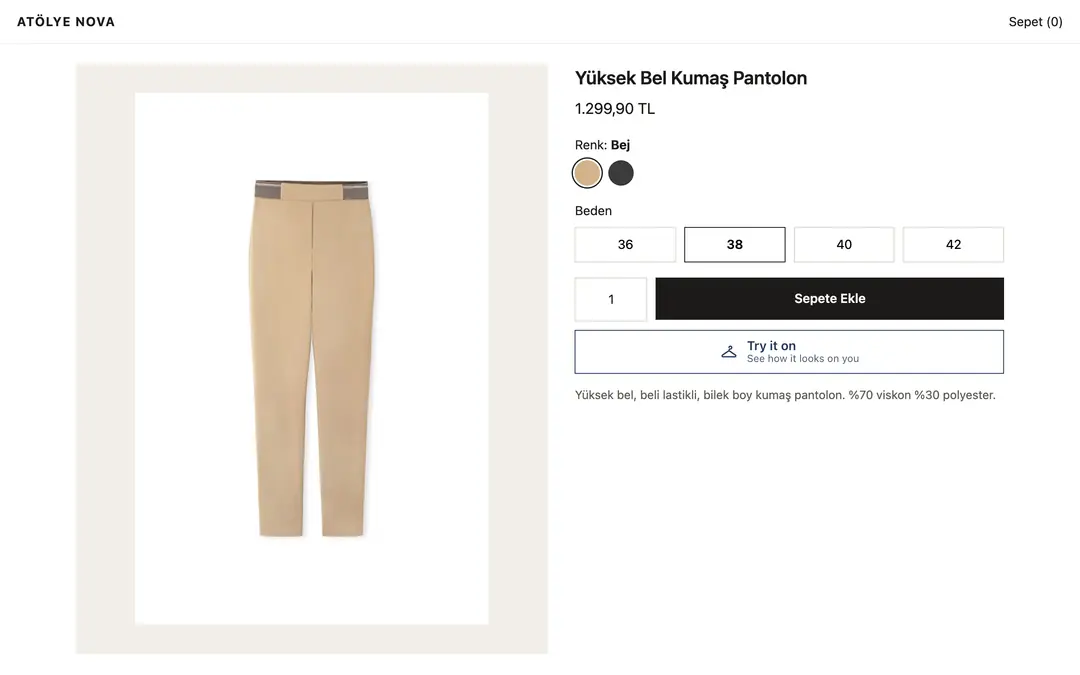
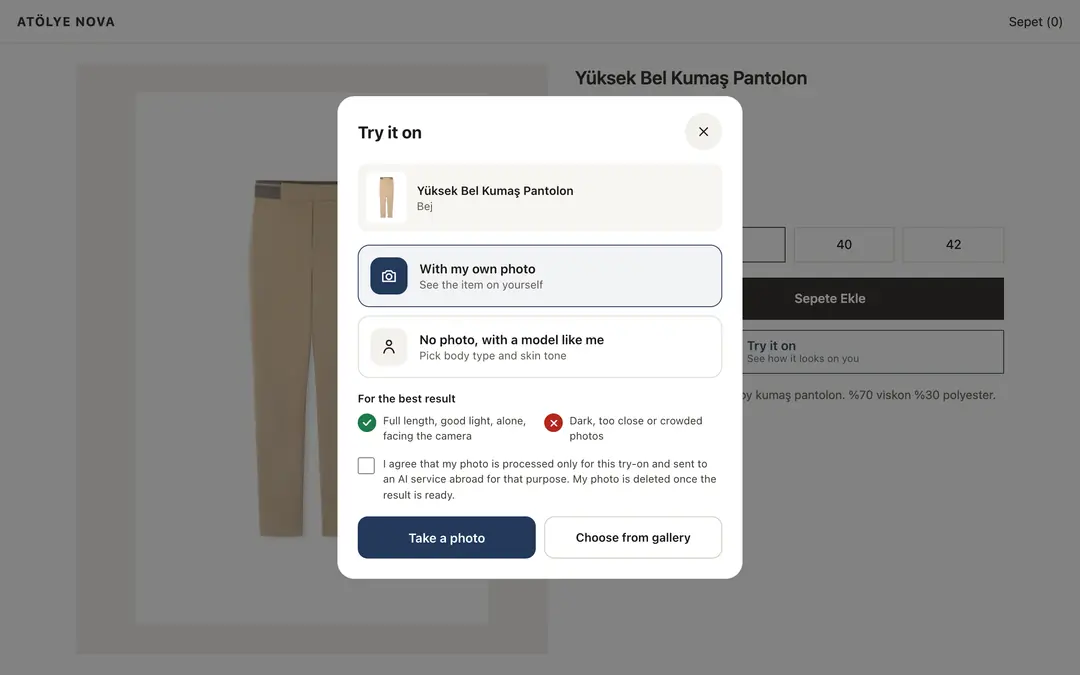
The question that stops online clothing sales: "How will this look on me?" Kabin answers it on your product page. A "Try it on" button is added to the product page; shoppers upload a photo or pick a ready-made model like them and see the item on themselves in about 15 seconds.
What shoppers get
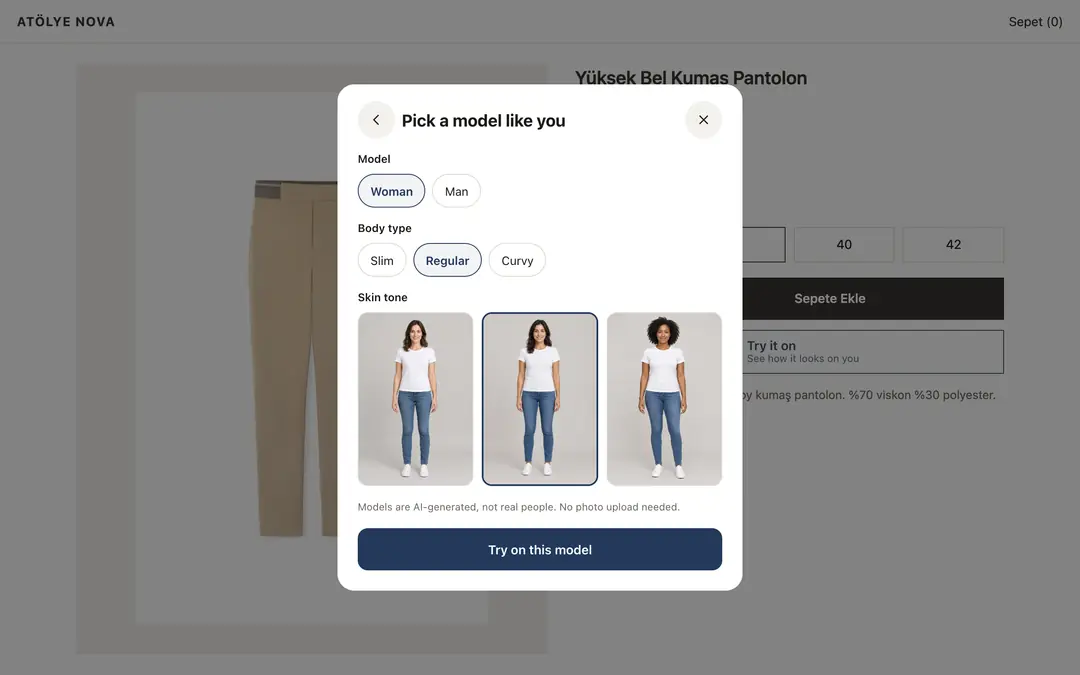
- With their own photo or without one: shoppers who prefer not to upload a photo pick a model close to their body type and skin tone. Models are AI-generated, not real people.
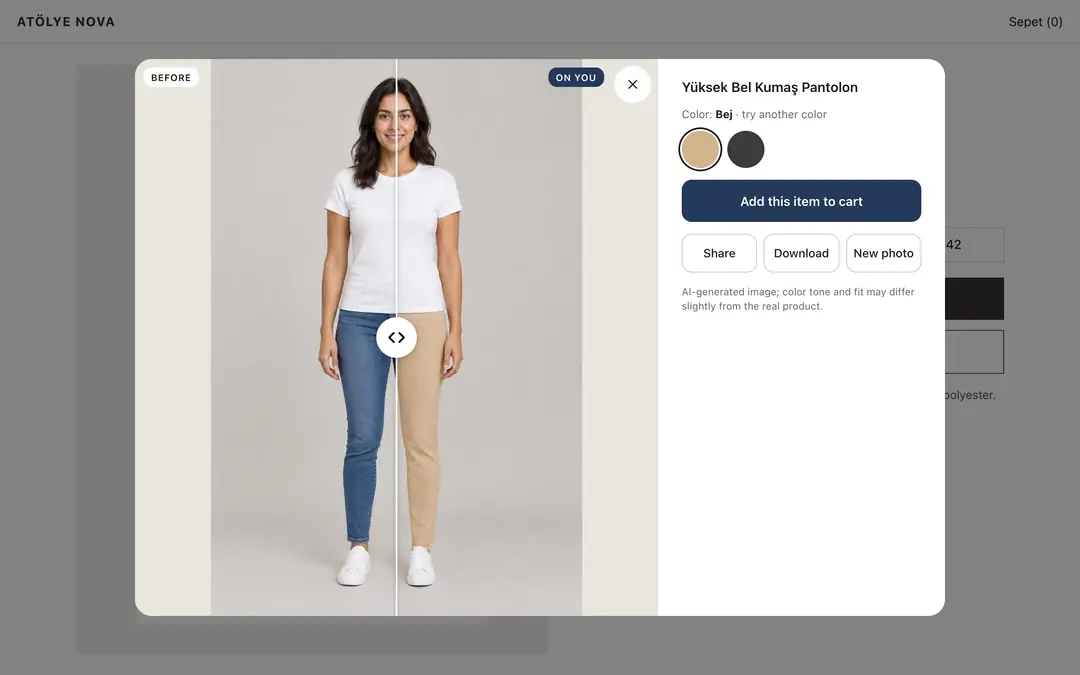
- True to the product: color, pattern, collar and length are kept; the shopper's face, skin tone and body shape stay the same.
- Before and after: a slider compares the original photo with the try-on.
- Try another color: other colors of the same item, with the same photo.
- Go to cart, share, download: "Add to cart" takes the shopper to your cart button with the chosen color. They can download the result and share it.
- Made for phones: opens as a bottom sheet and works with the phone camera; a wide view on desktop.
- Their real body, same framing: Kabin never slims or reshapes the shopper; the angle and framing stay the same, only the clothes change.
No wasted try-ons
- Only successful results use a try-on. If the photo is not suitable (dark, crowded, cropped), the shopper is told what kind of photo to use and nothing is deducted.
- Automatic quality check: every result is compared with the product before it is shown. If it does not match, it is generated once more; if it still does not match, it is not shown and the try-on is refunded.
- Limits against abuse: you set the daily try-ons per visitor and, optionally, a monthly cap.
Privacy
- Shoppers give explicit consent before uploading; a link to your own privacy notice can be shown next to it.
- The photo is processed only for that try-on and never stored in a database. Results are deleted from the server after 15 minutes.
- Photos of people under 18 and inappropriate photos are not processed.
In your panel
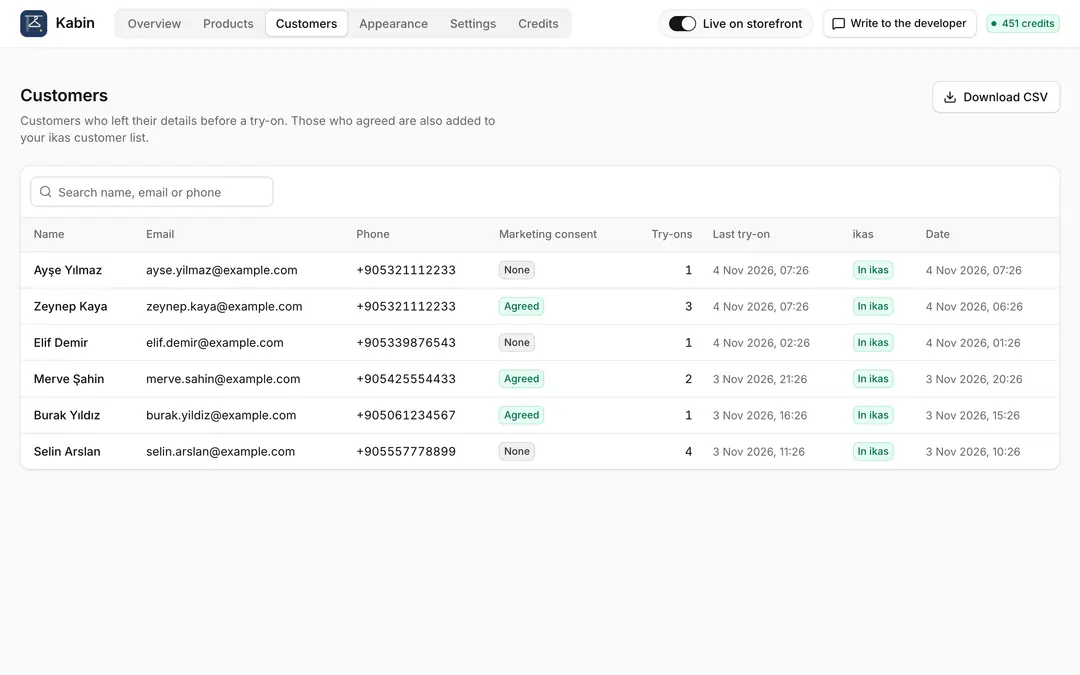
- Customers: before trying on, shoppers leave their email and phone and agree to share them with you; they are added to ikas as customers (marketing consent is separate and optional). See the list in the panel and download it as CSV. You can turn this off.
- Your logo on the result: optionally add your store logo to the corner of the result, so your store shows when shoppers share it.
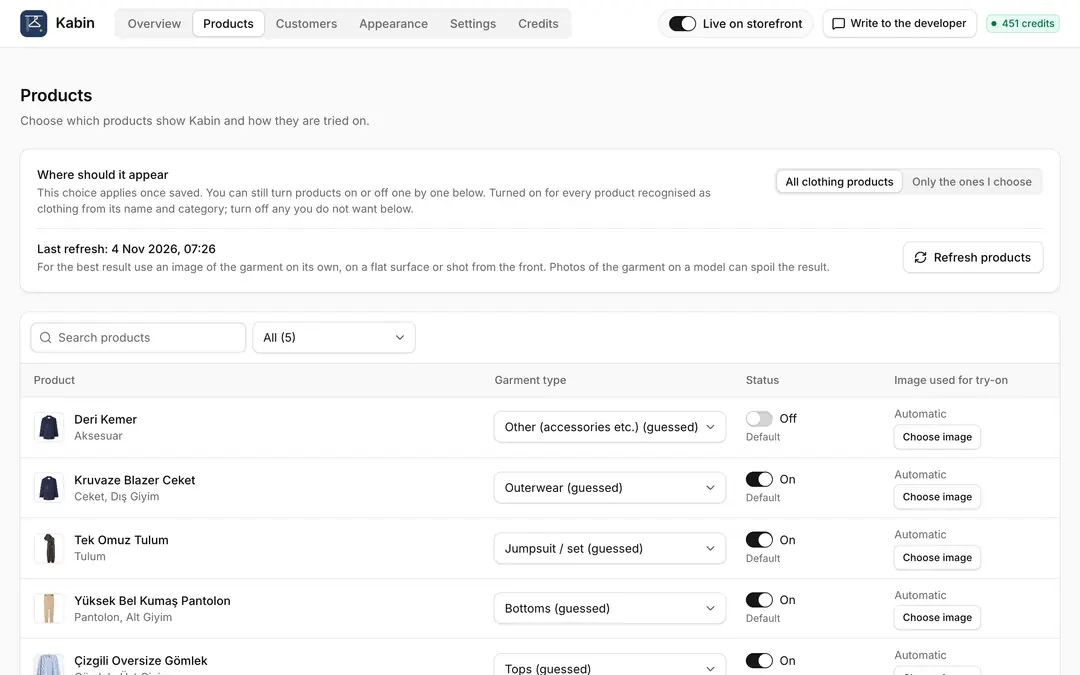
- Products: clothing is recognized from product names and categories, and Kabin turns on for it automatically. Turn products on or off one by one, set the garment type (top, bottom, dress, outerwear, jumpsuit) and choose the image used for try-ons.
- Appearance: set the button text (Turkish, English, German), color, style and corners, with a live preview. The button places itself under "Add to cart"; or put it where you choose, or use a floating button.
- Overview: try-ons, add-to-cart after a try-on and its rate, most tried products.
Good to know
Images are AI-generated; color tone and fit may differ slightly from the real product, and shoppers see this note. For the best results use a photo of the item on its own, laid flat or shot from the front. Kabin is made for clothing; it does not try on make-up, hair or glasses.
Pricing
Free to install with 20 try-ons included. Then try-on packs of 100, 300 or 1000. Try-ons never expire; when they run out the button disappears from your store and you get an email. No subscription.
Kabin – AI Virtual Try-On
Installs
Release date
Languages
Category
About Kabin – AI Virtual Try-On
The question that stops online clothing sales: "How will this look on me?" Kabin answers it on your product page. A "Try it on" button is added to the product page; shoppers upload a photo or pick a ready-made model like them and see the item on themselves in about 15 seconds.
What shoppers get
- With their own photo or without one: shoppers who prefer not to upload a photo pick a model close to their body type and skin tone. Models are AI-generated, not real people.
- True to the product: color, pattern, collar and length are kept; the shopper's face, skin tone and body shape stay the same.
- Before and after: a slider compares the original photo with the try-on.
- Try another color: other colors of the same item, with the same photo.
- Go to cart, share, download: "Add to cart" takes the shopper to your cart button with the chosen color. They can download the result and share it.
- Made for phones: opens as a bottom sheet and works with the phone camera; a wide view on desktop.
- Their real body, same framing: Kabin never slims or reshapes the shopper; the angle and framing stay the same, only the clothes change.
No wasted try-ons
- Only successful results use a try-on. If the photo is not suitable (dark, crowded, cropped), the shopper is told what kind of photo to use and nothing is deducted.
- Automatic quality check: every result is compared with the product before it is shown. If it does not match, it is generated once more; if it still does not match, it is not shown and the try-on is refunded.
- Limits against abuse: you set the daily try-ons per visitor and, optionally, a monthly cap.
Privacy
- Shoppers give explicit consent before uploading; a link to your own privacy notice can be shown next to it.
- The photo is processed only for that try-on and never stored in a database. Results are deleted from the server after 15 minutes.
- Photos of people under 18 and inappropriate photos are not processed.
In your panel
- Customers: before trying on, shoppers leave their email and phone and agree to share them with you; they are added to ikas as customers (marketing consent is separate and optional). See the list in the panel and download it as CSV. You can turn this off.
- Your logo on the result: optionally add your store logo to the corner of the result, so your store shows when shoppers share it.
- Products: clothing is recognized from product names and categories, and Kabin turns on for it automatically. Turn products on or off one by one, set the garment type (top, bottom, dress, outerwear, jumpsuit) and choose the image used for try-ons.
- Appearance: set the button text (Turkish, English, German), color, style and corners, with a live preview. The button places itself under "Add to cart"; or put it where you choose, or use a floating button.
- Overview: try-ons, add-to-cart after a try-on and its rate, most tried products.
Good to know
Images are AI-generated; color tone and fit may differ slightly from the real product, and shoppers see this note. For the best results use a photo of the item on its own, laid flat or shot from the front. Kabin is made for clothing; it does not try on make-up, hair or glasses.
Pricing
Free to install with 20 try-ons included. Then try-on packs of 100, 300 or 1000. Try-ons never expire; when they run out the button disappears from your store and you get an email. No subscription.
Kabin – AI Virtual Try-On
Installs
Release date
Languages
Category