About Damage & Loss Log
Damage & Loss Log records products that are damaged, broken, expired or lost, together with the reason, and deducts them from your ikas product stock. Download a monthly loss report and an internal record sheet with signature lines to keep tidy records to share with your accountant.
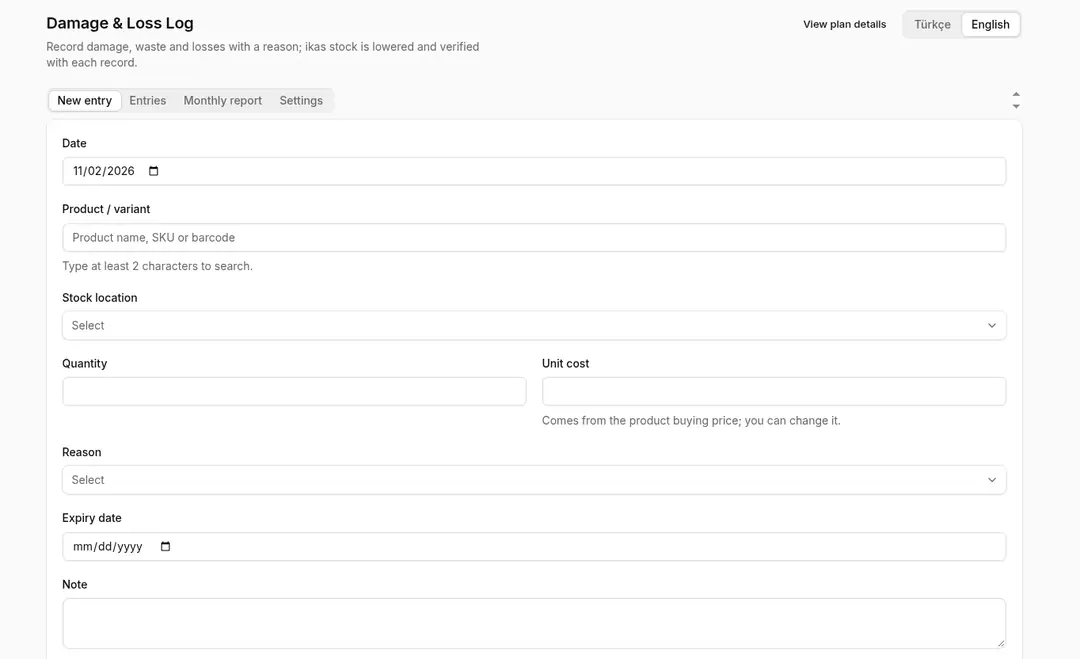
- Loss entry: Each entry holds the date, product and SKU, quantity, reason, the staff member who entered it, the approver and, optionally, an order number, an external document number and a photo. The approver is picked from the store's admin users, and stock is deducted from the stock location chosen on the entry. The photo is stored with the entry and deleted when the entry is deleted.
- Reasons: Pick a reason category such as damaged, broken, expired, lost or stolen, sample or promotion, or returned and unsellable.
- Stock deduction: When you confirm an entry, the product's stock in ikas is reduced by the recorded quantity.
- Cost: Cost is calculated from the product's buy price in ikas. Products with no buy price are marked "cost missing".
- Monthly report: See the month's loss entries by reason, with quantity and cost, and download the report as Excel, CSV or PDF.
- Internal record sheet: Download entries as an internal record sheet with signature lines to keep on file.
- Record keeping: The app helps you keep your loss records in order. Review your records with your accountant for any tax or accounting steps.
- How it differs from raw-material tracking: This app changes your ikas product stock; it does not track recipes or raw-material stock.
- Permissions: Requests read and write access to product data; stock is changed only for loss entries you confirm. It also reads basic store information.
- Not in this version: Export to accounting software and automatic loss detection are not part of this version.
- Turkish and English interface.
Setup
- Install the app on your ikas store and approve the permissions.
- Decide who enters loss records and who approves them.
- Pick the affected product, enter the quantity and reason, and confirm the entry.
- At month end, download the report and record sheet and share them with your accountant.
Plan and trial
- Plan: Pro.
- 7-day free trial

Damage & Loss Log


App Information
Stores with installations
0-50 stores
Release Date
31 October, 2026

Supported Languages
About Damage & Loss Log
Damage & Loss Log records products that are damaged, broken, expired or lost, together with the reason, and deducts them from your ikas product stock. Download a monthly loss report and an internal record sheet with signature lines to keep tidy records to share with your accountant.
- Loss entry: Each entry holds the date, product and SKU, quantity, reason, the staff member who entered it, the approver and, optionally, an order number, an external document number and a photo. The approver is picked from the store's admin users, and stock is deducted from the stock location chosen on the entry. The photo is stored with the entry and deleted when the entry is deleted.
- Reasons: Pick a reason category such as damaged, broken, expired, lost or stolen, sample or promotion, or returned and unsellable.
- Stock deduction: When you confirm an entry, the product's stock in ikas is reduced by the recorded quantity.
- Cost: Cost is calculated from the product's buy price in ikas. Products with no buy price are marked "cost missing".
- Monthly report: See the month's loss entries by reason, with quantity and cost, and download the report as Excel, CSV or PDF.
- Internal record sheet: Download entries as an internal record sheet with signature lines to keep on file.
- Record keeping: The app helps you keep your loss records in order. Review your records with your accountant for any tax or accounting steps.
- How it differs from raw-material tracking: This app changes your ikas product stock; it does not track recipes or raw-material stock.
- Permissions: Requests read and write access to product data; stock is changed only for loss entries you confirm. It also reads basic store information.
- Not in this version: Export to accounting software and automatic loss detection are not part of this version.
- Turkish and English interface.
Setup
- Install the app on your ikas store and approve the permissions.
- Decide who enters loss records and who approves them.
- Pick the affected product, enter the quantity and reason, and confirm the entry.
- At month end, download the report and record sheet and share them with your accountant.
Plan and trial
- Plan: Pro.
- 7-day free trial
Damage & Loss Log
App Information
Stores with installations
0-50 stores
Release Date
31 October, 2026
Supported Languages